
Recently, a colleague shared an important detail for organizers scheduling collaborative events with the new Teams Events app. When users schedule a Collaborative event, it’s comparable to a meeting in the Teams Calendar. Microsoft seems to be investing more in the Events app, as seen with recent enhancements such as a registration option for all event types and event templates for all users.
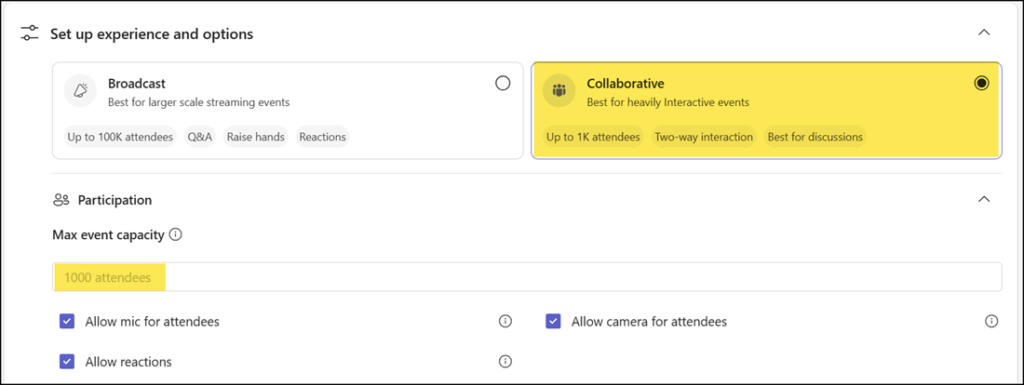
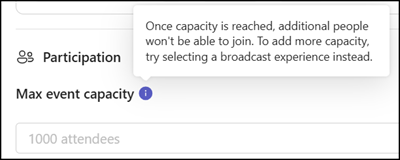
A key difference from a calendar event is the hard cap on the number of attendees. This restriction is noted within the event planning process, but organizers coming from the Teams Calendar may assume the behavior is the same. It’s also important to remember, organizers cannot change the event type after the event has been created. They must recreate the event.
- A Collaborative event scheduled in the Events app supports up to 1,000 interactive attendees. That is the hard limit. More than 1,000 attendees cannot join, nor can they join in view-only mode. Don’t ask your Teams admin to raise the number, it’s not possible.
- A meeting event scheduled via the Teams Calendar supports 1,000 interactive participants plus 10,000 view-only participants (the organizer needs a Teams Enterprise license).
Meetings are generally best for situations where participants need to interact with each other via voice, video, or chat and where multiple people might be presenting. Microsoft Teams meetings can support up to 11,000 participants. The first 1,000 participants can fully engage with audio, video, and screen sharing. Any extra participants—up to 10,000 more—join in a view-only mode, allowing them to watch the meeting without interacting.
- A Broadcast event scheduled in the Events app supports 3,000 interactive attendees (up to 100,000 with a capacity pack or Teams Premium Legacy license) OR 10,000 view-only attendees. A Broadcast event does not support a mixed scenario, meaning interactive and view-only attendees together. These 3,000 to 100,000 attendees are also a hard limit. The Teams event will reject the 3001st attendee if the capacity is not correctly defined.
An attendee pack determines the maximum capacity an organizer can set for a Teams event. Organizers can schedule an unlimited number of events as long as the license is assigned to them and is active through the contract term. The attendee limit is based on the number of attendees currently in the event at the same time. If attendees leave, other attendees can join until that limit is reached.
Keep in mind that organizers, co-organizers, and presenters don’t count toward the attendee limit.
