
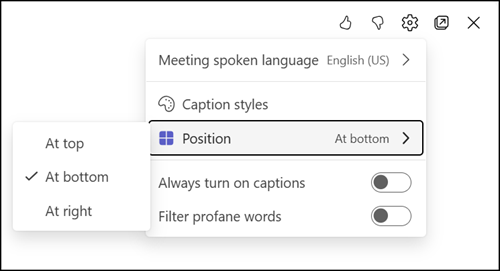
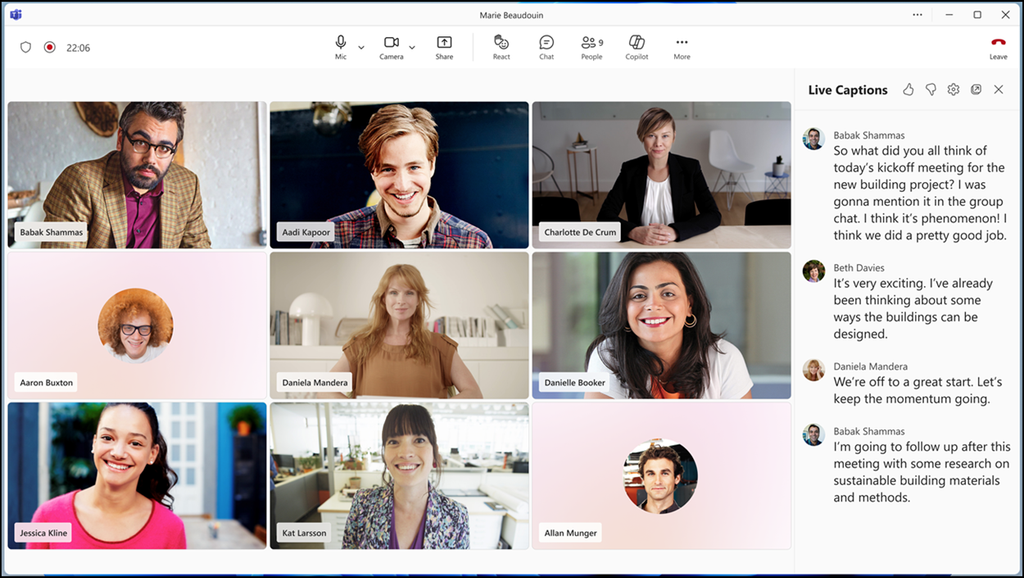
Microsoft is making live captions easier to use and easier to set up during Teams meetings. Users can now show captions in a new right-side panel, alongside the top, bottom, and pop-out layouts they already know. This should give them more flexibility to arrange the meeting window the way that suits them best, whether they want captions close to the shared content or tucked away to the side.
Caption settings are also being brought together in one place. Instead of looking for options in different spots, users will find all caption settings in a single menu inside the captions pane.
The updated settings panel covers:
- The spoken language
- The translation language
- The caption display style
- Profanity filtering
- A new option to turn on live captions automatically. Once users enable it, live captions start on their own in future meetings, provided the meeting and feature settings of their organization allow it.
- The translation language setting is synchronized between captions and the Interpreter agent (for Copilot Premium users), so users no longer need to set it up separately for each.
- Users can also share quick feedback on the live captions experience with new thumbs-up and thumbs-down controls.
These updates should help users who rely on live captions or translated captions in Teams calls, meetings, and events. They do not change how an organization has configured Teams policies, such as when live captions are disabled. The rollout should be completed by the end of October 2026 for Teams on Windows, Mac, and the web.
