
Teams Mobile now supports outbound calls with multi-line numbers

As posted in May, Teams Phone administrators can add up to 11 phone numbers to a Teams account: one primary, one private, and nine alternate.
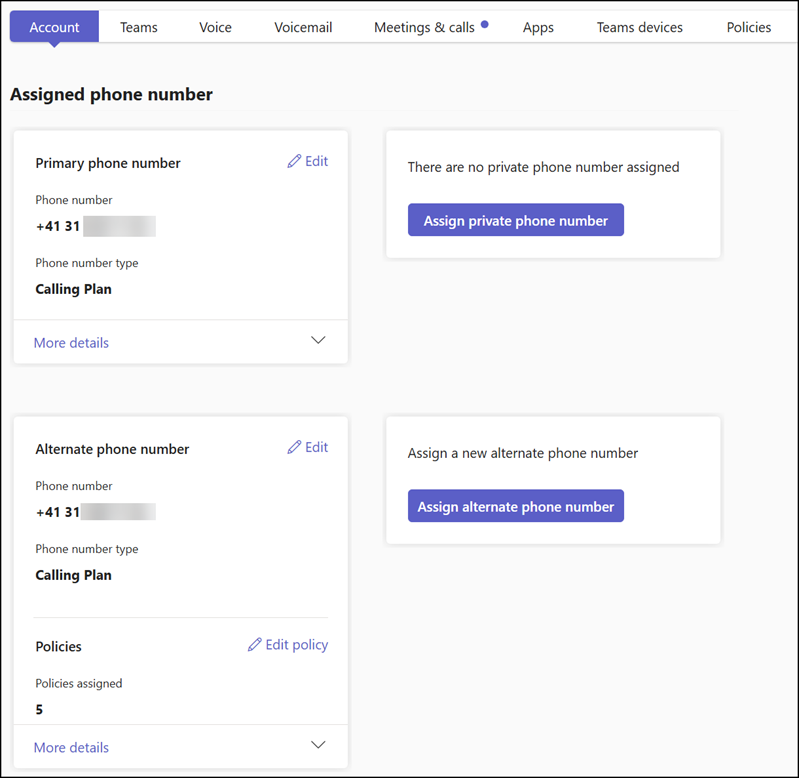
Multi-line number configuration in the Teams admin center
Read:  Multi-line support for Teams Phone users

When I tested this feature in May, users could receive calls to a multi-line number on Teams Mobile, but they could not yet select it for outbound calls. This capability is now available in Teams Mobile.

Users can select the alternative numbers in the call app. As on desktop, they select the small option next to their number to open the assigned numbers, then select the number to call from. Teams saves the selection for the next call, so users should remember to update the outbound number if needed.
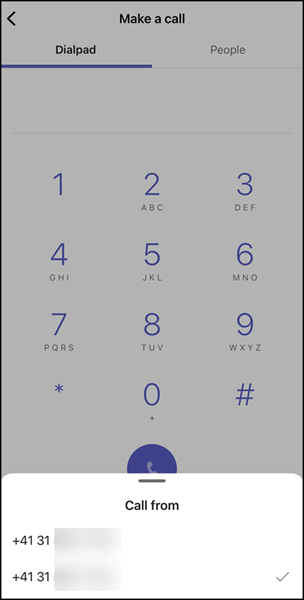
Multi-line support for outbound calls on Teams Mobile

The outbound number is also stored in the call history, unless disabled by the user or a Teams administrator.
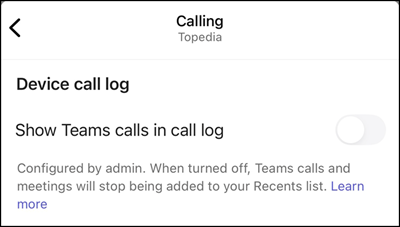

Call history was disabled by the organization
Avatar photo

Tobias Asböck

Tobias is a Senior System Engineer with more than 10 years of professional experience with Microsoft 365 products such as SharePoint Online, SharePoint Premium, OneDrive for Business, Teams Collaboration, Entra ID, Information Protection, Universal Print, and Microsoft 365 Licensing. He also has 15+ years of experience planning, administering, and operating SharePoint Server environments. Tobias is a PowerShell Scripter with certifications for Microsoft 365 products. In his spare time, Tobias is busy with updates in the Microsoft 365 world or on the road with his road bike and other sports activities. If you have additional questions, please contact me via LinkedIn or [email protected].

Leave a Comment