
Microsoft is introducing a new governance experience in the Teams admin center that allows administrators to manage built-in Teams agents in a dedicated, centralized location. These built-in agents are now integrated directly into core Teams experiences and do not require installation from the app store.
The following agents are affected by this change. Users need a Microsoft 365 Copilot license for the agents.
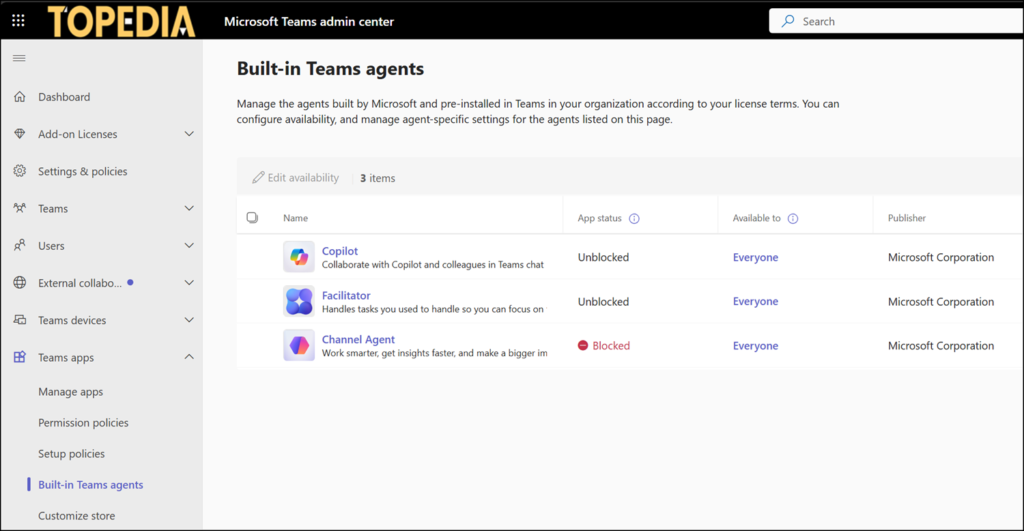
This update separates governance for built-in agents from traditional Copilot agents, bringing them into a single, dedicated management surface and enabling more precise policy management.
To manage these agents, open the Teams Admin Center and navigate to Teams Apps > Built-in Teams agents.
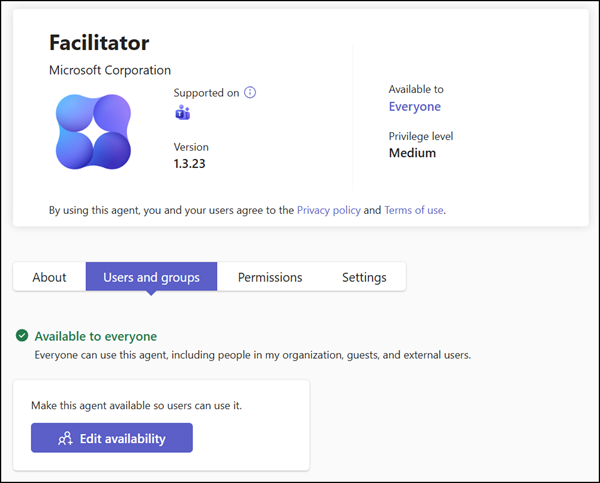
Administrators can allow or block individual built-in agents, assign access to specific users or groups, and configure agent-specific settings. Going forward, the install action will no longer appear for these built-in agents, as such built-in Teams agents never required separate installation. These agents are managed via the availability configuration and the Microsoft 365 Copilot license assignment.
Important:
Built-in Teams agents are no longer governed by the org-wide Teams app settings. These agents were previously available in the Teams apps section, but are now separated from the traditional apps.
Existing agent-level configurations should remain unchanged after rollout, and for users who already have an agent installed, those installs will be carried forward so the agent remains available to them. Teams administrators should review the configuration for the built-in Teams agents.
