
In May, Microsoft added Awards and Certifications to the Microsoft 365 profile card in the Outlook Org Explorer. I also described how to add them via the Microsoft Graph API.
As a reminder:
Profile cards in the Outlook Org Explorer and in other products, such as Teams or the Org Explorer app in copilot.cloud.microsoft, do not offer the same feature set. The Org Explorer in Outlook includes the latest features.
Until recently, users couldn’t see Awards and Certifications on the Teams profile card.
Microsoft is now rolling out an update that also shows Awards and Certifications on the profile card in Teams.
- In my case, they are still not visible in the Org Explorer app in the Microsoft 365 Copilot Web.
- Awards and Certifications are also not available in the Org Explorer app in Teams. You must check the Teams profile card.
- Sometimes there is no logical explanation for why Microsoft 365 profile cards differ across products.
When users open a colleague’s profile card in Teams, they find the new section on the Overview and Contact tabs, directly below the Skills section. Each award or certification shows its title and the issuing organization. Selecting a badge reveals more details, such as a description and the award date. This should make it easier for users to recognize their colleagues’ expertise and achievements and to find the right person to ask for help on a specific topic.
Important:
Awards and Certifications must be managed via Microsoft Graph. There is no user interface to add or update them manually. Read my May post on how to add, update, or delete these items.
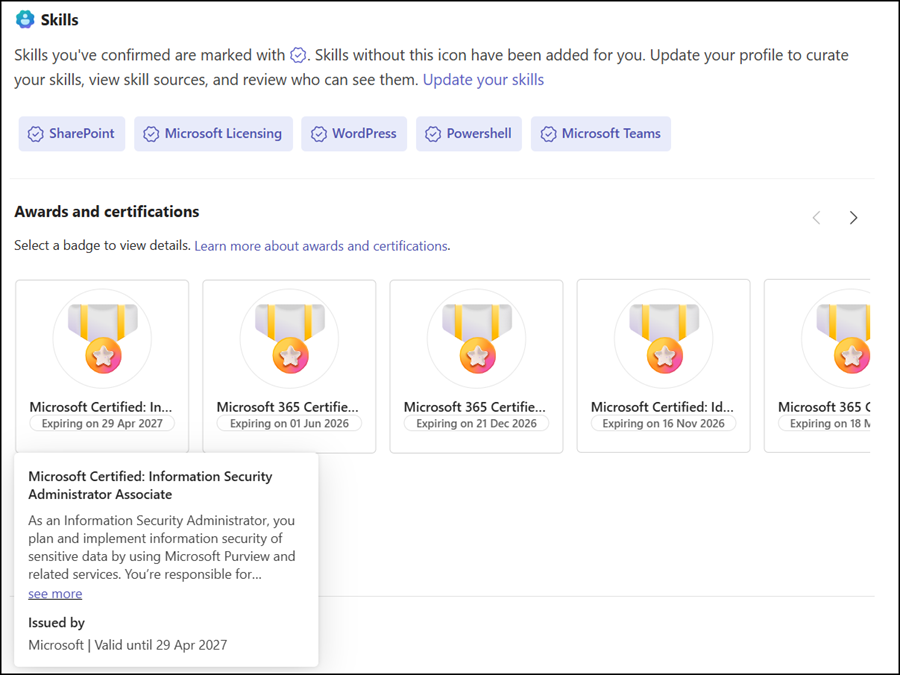
The section appears only if awards or certifications have been added to a person’s profile. Otherwise, profile cards look the same as before.
The Teams rollout should be completed in October 2026.
