
Microsoft 365 profile cards can now include Awards and Certifications, surfacing existing values from the Microsoft 365 profile schema. The change is a UX enhancement and affects only organizations already populating the Awards and Certifications information in people profiles. Other organizations will see no change, and the new section will not appear on profile cards.
The organization must populate the information via Microsoft Graph; users cannot add or update it directly on their profile cards.
Timeline
The rollout should be completed.
How does this affect your users?
A new Awards and Certifications section has been added to the Microsoft 365 profile card in the overview and contacts tab, below the skills section. Each entry shows the title and issuer by default. Selecting a badge reveals additional details such as the description and date awarded.
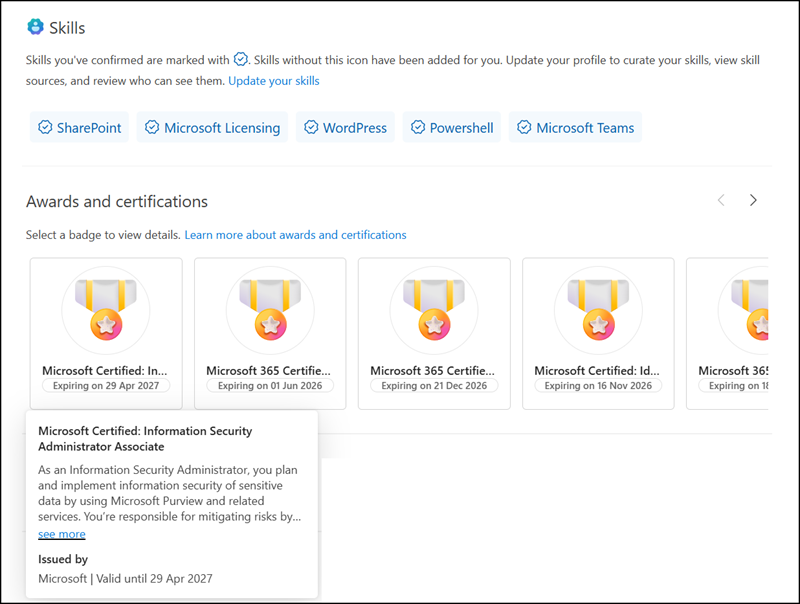
Microsoft 365 profile cards are different!
Currently, Awards and Certifications are only available on the profile card in Outlook, such as in the Outlook Org Explorer. Profile information on the cards varies across products. The Org Explorer in Outlook includes the latest information.
For example, Awards and Certifications are not yet available on the profile card in Teams, in the Org Explorer when opened via Microsoft 365 Copilot Chat, nor via the Microsoft 365 People Search.
How to populate Certifications and Awards as an admin?
Admins can populate or update the information via Microsoft Graph and the personCertification or personAward endpoints. User.ReadWrite permissions are required; application permissions are not yet supported. Users cannot add or update the information directly on their profile card.
I prepared two samples: one for creating a new certification and one for an award.
- I tested the thumbnailUrl property with various formats and sizes, but the system does not use it. Microsoft does not document the format required for the thumbnail to be used in certifications and awards, or whether it is already supported. The system always replaces the thumbnailUrl with the Microsoft-defined placeholder.
- Certifications must be updated manually when expiration date information is added. An Award does not include an expiration date.
- An update to Certifications and Awards on the profile cards takes up to 12 hours.
Creating a new Certification
Connect-MgGraph -Scopes "User.ReadWrite"

$Body = @{
    certificationId  = "exam.ms-401"
    displayName      = "Microsoft Certified: Information Security Administrator Associate"
    description      = "As an Information Security Administrator, you plan and implement information security of sensitive data by using Microsoft Purview and related services. You’re responsible for mitigating risks by protecting data inside collaboration environments that are managed by Microsoft 365 from internal and external threats and protecting data used by AI services. You also implement information protection, data loss prevention, retention, insider risk management, and manage information security alerts and activities."
    issuingAuthority = "Microsoft"
    issuingCompany   = "Microsoft"
    issuedDate       = "2025-04-28"
    endDate          = "2027-04-29"
    webUrl           = "https://learn.microsoft.com/en-us/credentials/certifications/information-security-administrator/"
    thumbnailUrl     = "https://blog-en.topedia.com/ta-data/microsoft-certified-associate-badge-512x512.svg"
    allowedAudiences = "organization"
} | ConvertTo-Json

Invoke-MgGraphRequest `
    -Method POST `
    -Uri "https://graph.microsoft.com/beta/users/<UserPrincipalName>/profile/certifications" `
    -Body $Body `
    -ContentType "application/json"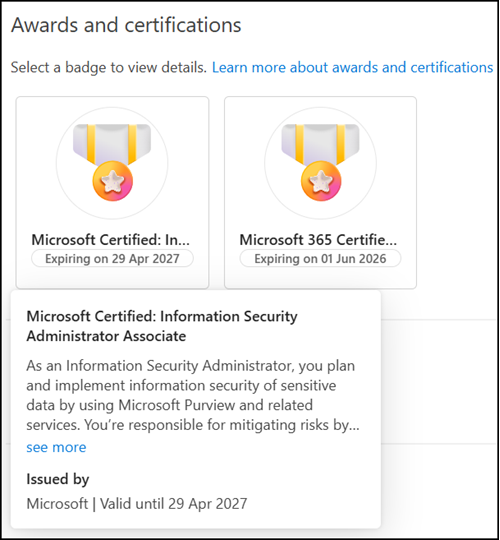
Creating a new Award
Connect-MgGraph -Scopes "User.ReadWrite"

$Body = @{
    description      = "Introducing Topedia Blog"
    displayName      = "Launching a new blog about Microsoft 365, Licensing, SharePoint, OneDrive, Teams, PowerShell, and more."
    issuedDate       = "2020-04-01"
    issuingAuthority = "Topedia"
    thumbnailUrl     = "https://blog-en.topedia.com/ta-data/TopediaBlogAward-Launched.png"
    webUrl           = "https://blog-en.topedia.com/"
    allowedAudiences = "everyone"
    isSearchable     = $false
} | ConvertTo-Json

Invoke-MgGraphRequest `
    -Method POST `
    -Uri "https://graph.microsoft.com/beta/users/<UserPrincipalName>/profile/awards" `
    -Body $Body `
    -ContentType "application/json"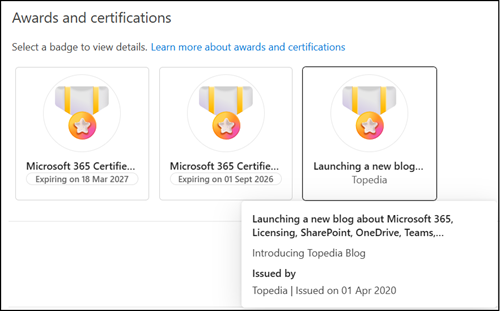
An update is straightforward. Use the updated JSON from creation and PATCH it with the certification or award ID from the profile.
# Get and list all certifications from a profile
$UPN = "<UserPrincipalName>"
$CertResults = Invoke-MgGraphRequest `
    -Method Get `
    -Uri "https://graph.microsoft.com/beta/users/$UPN/profile/certifications"
$CertResults.value | select id,displayName


# Update the certification
$CertBody = @{
        endDate = "2028-04-29"
} | ConvertTo-Json


$Url = "https://graph.microsoft.com/beta/users/$UPN/profile/certifications/<CertificationID>"
Invoke-MgGraphRequest `
    -Method PATCH `
    -Uri $Url `
    -Body $CertBody `
    -ContentType "application/json"
Same to delete a certification or award.
# Delete a certification
Invoke-MgGraphRequest `
    -Method DELETE `
    -Uri "https://graph.microsoft.com/beta/users/$UPN/profile/certifications/$($Cert.id)"