
A new Recap app is now available in Microsoft Teams, giving users a single place to find, review, and catch up on meeting recaps. Instead of navigating individual meeting invites, users can bring recordings, transcripts, and AI-powered summaries together in a single experience.
The app is pre-installed in Teams for all users and accessible in the left menu (via the …). Users can pin the app, though it is not pinned by default.
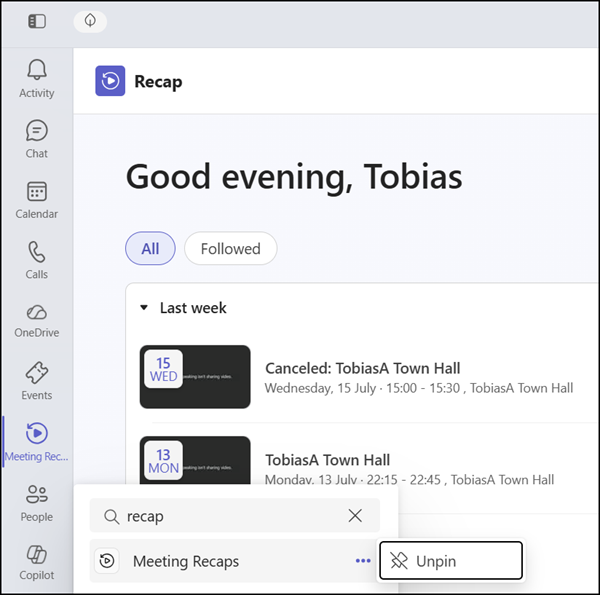
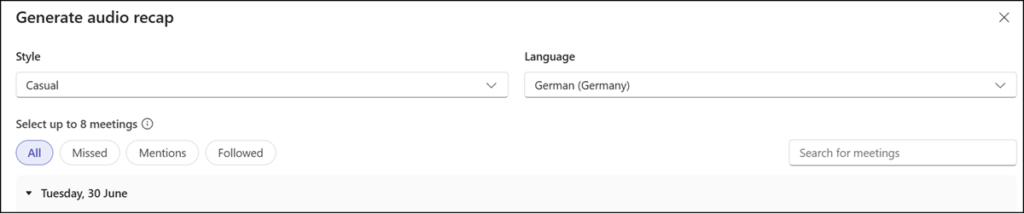
Recaps are available for any meeting from the past 30 days that includes a recording or transcript. Eligible users can choose to watch a video recap or listen to an audio recap in a podcast-style format. As previously available, the Recap app can generate a combined audio recap that pulls up to 8 meetings together for efficient listening.
License requirements:
- Users with a Microsoft 365 Copilot license can use AI-powered features, including audio recap and video recap.
- Users with a Microsoft 365 Copilot or Teams Premium license can use intelligent recap summaries.
- Users without a Copilot or Teams Premium license can still access their recordings and transcripts, based on their existing permissions, but without the enhanced summary experience.
The Meeting Recap app should be available in July 2026 for Teams for Windows, Mac, and Web, with iOS and Android support coming soon.
Updated 12 August 2026:
The Meeting Recap app should be available by August 2026 for Teams for Windows, Mac, and Web, with iOS and Android support coming soon.
