
Microsoft has improved how Teams handles Purview Audit Logs for meetings scheduled by people from external organizations.
Until now, when an internal user joined a Teams meeting hosted by an external organization, only the external tenant logged the participant details.
Microsoft has updated this behavior: Compliance administrators in the user’s own organization can now also see information about their external participation, whereas previously only compliance administrators in the organization that set up the meeting had this visibility.
The external tenant populates the information into the participant’s home tenant, in the name of the external organizer. For privacy reasons, Teams populates the information only for attending internal participants from the organization, not the full list of all meeting participants.
The Audit Logs include the following details, populated in the name of the external organizer:
- Information about the external organizer
- The invite time (when the meeting was sent)
- Information about the external organization (the IDs)
- Information about the external meeting (the IDs)
- The internal participant
- When the participant joined and left the meeting
- The meeting chat thread ID
- …
Note:
The external tenant needs time to populate the information in your organization. Expect 8 to 12 hours for the audit record to appear in your tenant’s log.
Search for a record with the activity “Added information about meeting participants” to find such activities. It’s the operation MeetingParticipantDetail.

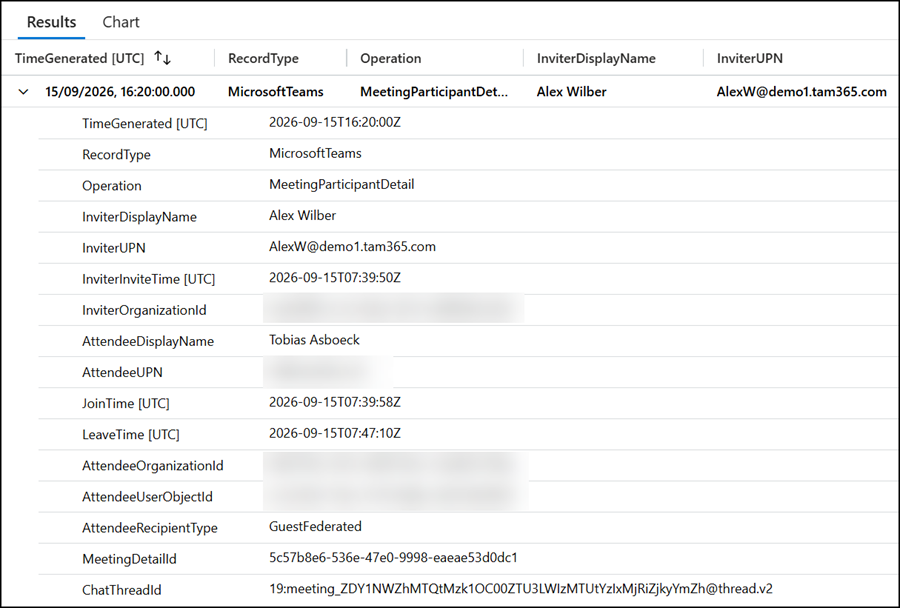
I have also prepared a sample with my Sentinel Logs.
OfficeActivity
| where TimeGenerated > ago(12h)
| where OfficeWorkload == "MicrosoftTeams"
| where Operation == "MeetingParticipantDetail"
| mv-expand Attendees
| extend
    InviterDisplayName = tostring(Attendees.InviterInfo.DisplayName),
    InviterUPN = tostring(Attendees.InviterInfo.UPN),
    InviterInviteTime = todatetime(Attendees.InviterInfo.InviteTime),
    InviterOrganizationId = tostring(Attendees.InviterInfo.OrganizationId),
    AttendeeDisplayName = tostring(Attendees.DisplayName),
    AttendeeUPN = tostring(Attendees.UPN),
    AttendeeOrganizationId = tostring(Attendees.OrganizationId),
    AttendeeUserObjectId = tostring(Attendees.UserObjectId),
    AttendeeRecipientType = tostring(Attendees.RecipientType)
| project TimeGenerated, RecordType, Operation, InviterDisplayName, InviterUPN, InviterInviteTime, InviterOrganizationId, AttendeeDisplayName, AttendeeUPN, JoinTime, LeaveTime, AttendeeOrganizationId, AttendeeUserObjectId, AttendeeRecipientType, MeetingDetailId, ChatThreadId
In my sample, check when I joined the external meeting (07:39 UTC) and when the external organizer populated the event as a Purview record in my tenant (16:20 UTC). The delay is more than 8 hours. So, calculate an 8 to 12 hour delay. It’s just the population time; the event records are correct.
This update does not change how meetings look, sound, or work for people joining them. Users do not need to do anything differently when scheduling, joining, or attending a Teams meeting, as they already know. The update should give compliance administrators better insight into their users’ meeting activity, which can help with security and support.
