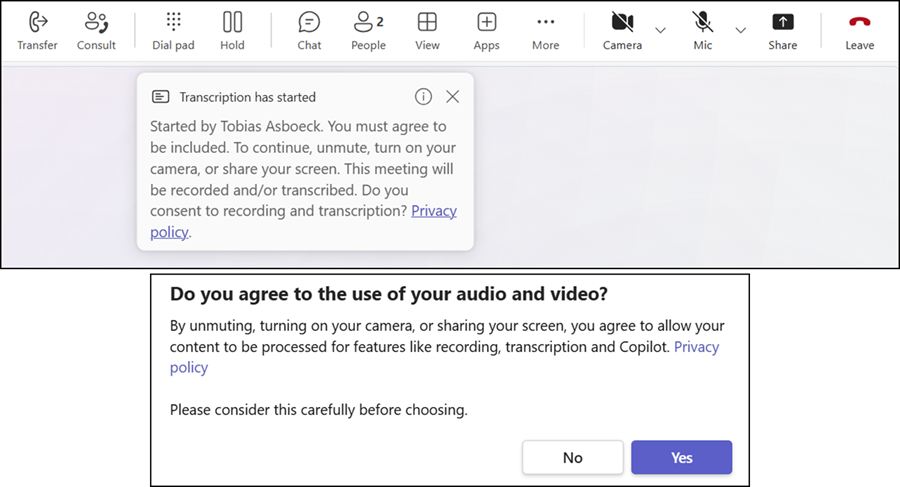
Microsoft introduced customized consent notifications for Teams recording and transcription in February 2026. Until now, these customizations were available only for meetings. Microsoft is now rolling out the customized consent notifications to Teams Phone.
I already described how to prepare such customization templates with PowerShell. Administrators can now also use these templates in Teams Calling policies.
As with meeting policies, the required properties EnableRecordingAndTranscriptionCustomMessage and RecordingAndTranscriptionCustomMessageIdentifier are also available in Teams Calling policies. These properties were already available in February, but Teams did not use the templates when administrators configured them (I tested it). This configuration is now active once the rollout is complete.

Updating both settings is straightforward.
- Get the available message templates with Get-CsTeamsRecordingAndTranscriptionCustomMessage, or prepare a new template with my PowerShell samples. Such a template always starts with “Global/….”.

- Assign the template to a calling policy. Don’t forget to enable the setting EnableRecordingAndTranscriptionCustomMessage.
Set-CsTeamsCallingPolicy `
    -Identity "<PolicyName>" `
    -EnableRecordingAndTranscriptionCustomMessage $true `
    -RecordingAndTranscriptionCustomMessageIdentifier "<RecordingAndTranscriptionCustomMessageTemplateID>"
- Test it with a phone call.
- Customized consent notifications are supported for VoIP calls to internal and external users.
- Explicit recording consent with customized consent notifications is supported for VoIP calls to internal and external users.
- PSTN calls (for example, calls to landline or mobile numbers) do not yet support explicit consent or customized consent notifications.
- Customized consent notifications are now also available in the Teams mobile app. This platform was missing when the feature launched in February.