
Microsoft Purview Data Lifecycle Management now supports managing retention policies for Teams call logs in the Purview admin portal.
Microsoft introduced retention policies for Teams call detail record (CDR) logs and related call log data in late April 2026. A Purview compliance administrator had to manage these retention policies with PowerShell.
Before April 2026, CDR logs and related data were stored alongside Teams compliance data in Exchange Online mailboxes and were retained indefinitely, with no way to apply retention or deletion controls. This created a compliance gap for organizations subject to regulatory requirements that specify maximum retention periods for calling-related data.
From the documentation:
This separate retention policy for call logs can be created and modified only by using PowerShell.
It has the following considerations:
- The policy includes call logs for both Teams chat and Teams channels.
- The policy applies only to new call logs that are created after the policy is configured and active.
After you create the retention policy for Teams call logs, it’s displayed in Data Lifecycle Management > Policies in the Microsoft Purview portal, where it’s visible but read-only.
Compliance administrators can now create, modify, and delete retention policies scoped to Teams call logs directly in the Purview admin portal, without relying on PowerShell. The retention policy includes a new location for “Teams Call Logs and Call Data Records”.
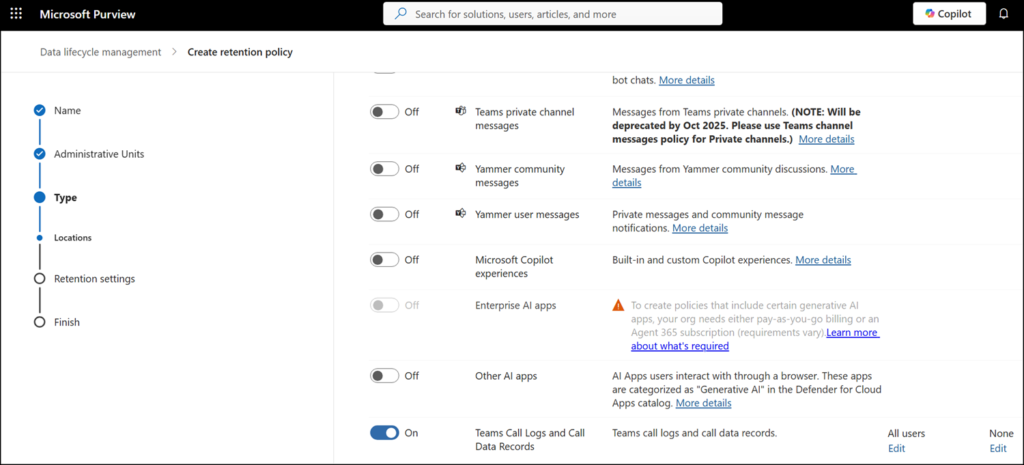
Once a policy scoping call log is configured, the affected call log data is no longer retained indefinitely and is retained or deleted according to the policy settings. There is no impact to the Teams calling experience itself. This change affects only how call log data is governed in the backend.
Also, a notable point in case someone plans to obtain a Microsoft Applied Skill for Purview Data Lifecycle Management. There are sometimes questions about how many retention policies are needed for different locations. The Teams Call Logs retention policy is always a separate policy. Other locations cannot be enabled if CDRs are to be included.
This capability is available to organizations with the appropriate Microsoft Purview compliance licensing that includes Data Lifecycle Management. Unfortunately, the licensing documentation has not yet been updated for Teams Call Logs retention policies.
