
Microsoft has improved the Multilingual Speech Recognition feature and how meeting recaps work for multilingual Teams meetings.
After a meeting ends, the recap initially appears in the same translation or interpretation language a participant selected during the meeting, whether through translated captions or the Interpreter agent.
As a result, different participants may see their recap in different languages in the same meeting, matching what they selected during the meeting. For example, if someone chose French captions during a German-language meeting, their recap first shows up in French.
If this feature sounds familiar, it’s because the feature has been in Public Preview since at least November 2025, as documented. Users with a Teams client in Public Preview could already use the feature. As I understand it, the feature is now rolling out to general availability.
This feature is currently in Public preview.
Intelligent meeting recap for multilingual meetings translates the meeting’s recap into each participant’s language. When the meeting ends, the recap appears in the language each participant selected for live translated transcription. Intelligent meeting recap for multilingual meetings currently supports translation in the following languages: English, Spanish, Japanese, French, German, Portuguese, Italian, Mandarin (Simplified Chinese), and Korean.
***********
Updated 15 September 2026:
The rollout should be completed by October 2026.
***********
The additional improvement is meeting participants can now switch to another supported language once the recap is ready. This choice only changes how the recap looks for them, without altering the underlying transcript, recording, or original meeting content.
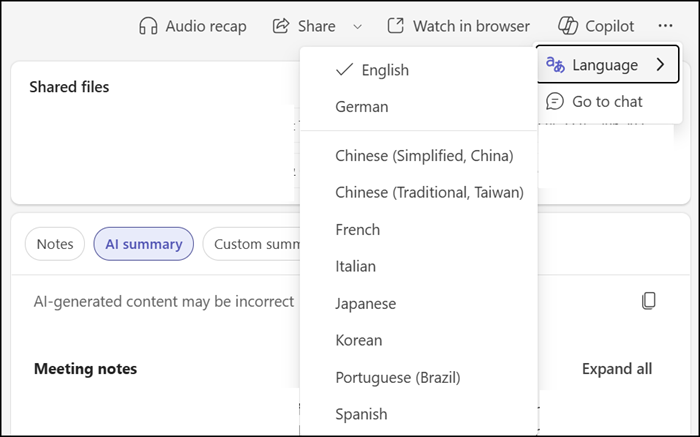
This improvement should make it easier for people in multilingual meetings to review what was discussed in the language they were already following, making meeting content more accessible and easier to pick back up afterward.
Some notes to know:
- The update is available to users with access to the intelligent meeting recap feature, part of a Teams Premium and Microsoft 365 Copilot license.
- An organizer must enable the multilingual speech recognition feature in meetings; otherwise, the “Language” option won’t appear in recaps.
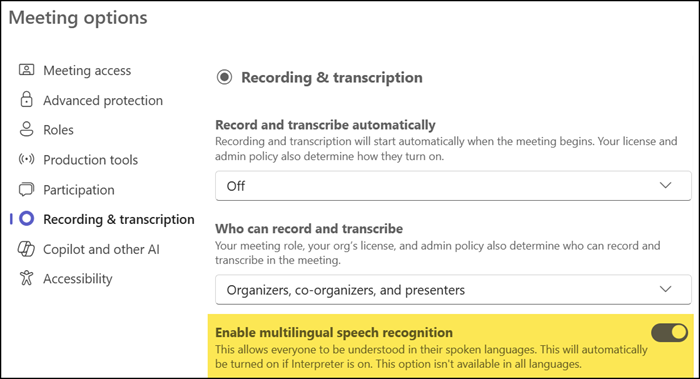
- The multilingual speech recognition feature is enabled by default for users using the Interpreter agent. A Microsoft 365 Copilot license is required for the Interpreter agent.
- The rollout to general availability on all platforms (Teams for Windows, Mac, Web, iOS, and Android) should be completed by September 2026.
I also want to mention my post from November 2025, where I explained some Teams language translation capabilities.
