
Collaborate on Markdown files with co-authoring and autosave in OneDrive and SharePoint

Microsoft is extending Markdown file support in OneDrive and SharePoint, introduced in May.

Read:  Native Markdown support in OneDrive and SharePoint

OneDrive and SharePoint now support co-authoring and autosave for Markdown files, as with Office file formats. Multiple users can edit the same Markdown file together in the web experience, with changes saved automatically, reducing the risk of lost work and removing the need to manage versions manually. This update is currently rolling out.

To use it, share the Markdown file with a coworker in Edit mode. The usual coworker signals appear, and if others are changing text, the edits show in real time.
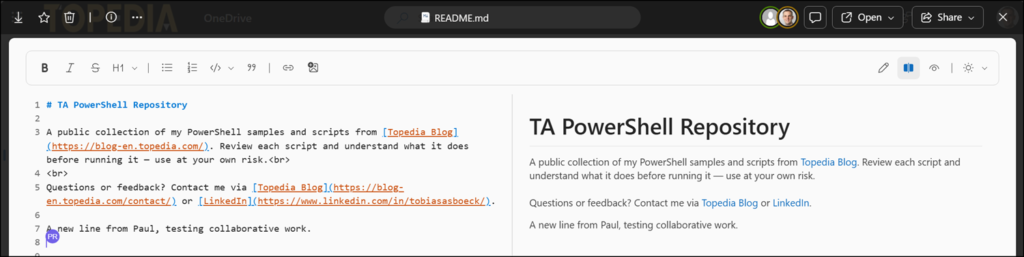
Collaborating on a Markdown file

Users can now also add inline comments to Markdown files, in addition to general document comments. Mark your comment text and use the small comment icon

Add a new inline comment

The comment jumps to the position and highlights the text.
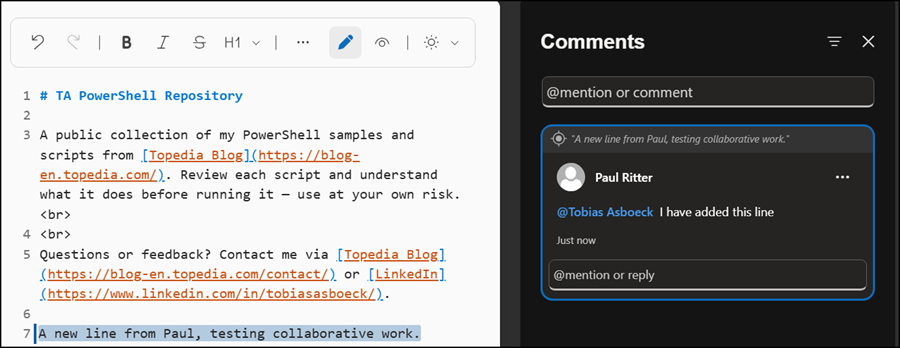
The comment jumps to the position and highlights the text.

The comment jumps to the position and highlights the text
Avatar photo

Tobias Asböck

Tobias is a Senior System Engineer with more than 10 years of professional experience with Microsoft 365 products such as SharePoint Online, SharePoint Premium, OneDrive for Business, Teams Collaboration, Entra ID, Information Protection, Universal Print, and Microsoft 365 Licensing. He also has 15+ years of experience planning, administering, and operating SharePoint Server environments. Tobias is a PowerShell Scripter with certifications for Microsoft 365 products. In his spare time, Tobias is busy with updates in the Microsoft 365 world or on the road with his road bike and other sports activities. If you have additional questions, please contact me via LinkedIn or [email protected].

Leave a Comment