
Native Markdown support in OneDrive and SharePoint

OneDrive and SharePoint now support viewing and editing Markdown (.md) files directly in the browser, with no additional tools or downloads required.

Timeline

The rollout should be completed in May 2026.

How does this affect your users?

Users no longer need to download Markdown (.md) files to view or edit them. Previously, Markdown files in OneDrive and SharePoint lacked native browser rendering and required downloading or a third-party tool.

With this update, opening a .md file launches a side-by-side interface in your browser: a raw Markdown editor on the left and a live-rendered preview on the right.

  • The rendered view supports tables, images, code blocks, and links, using Fluent 2 typography.
  • A formatting toolbar covers common Markdown actions without requiring knowledge of the syntax, and the editor renders a real-time preview as users type.
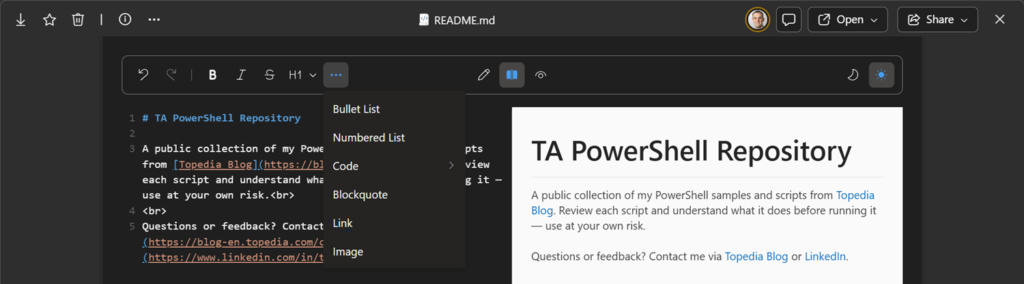
Markdown sample in OneDrive from my public PowerShell repository

Users can now also create new Markdown documents directly in OneDrive and SharePoint libraries, managing them throughout their lifecycle alongside other Microsoft 365 files.
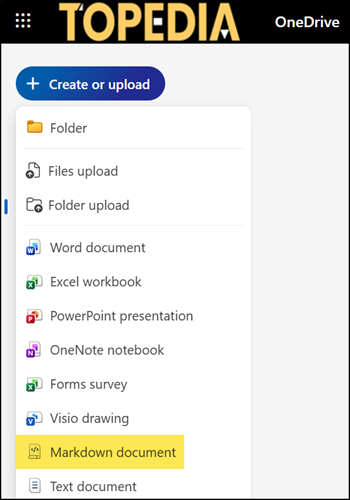

Create a new Markdown document
Share
Avatar photo

Tobias Asböck

Tobias is a Senior System Engineer with more than 10 years of professional experience with Microsoft 365 products such as SharePoint Online, SharePoint Premium, OneDrive for Business, Teams Collaboration, Entra ID, Information Protection, Universal Print, and Microsoft 365 Licensing. He also has 15+ years of experience planning, administering, and operating SharePoint Server environments. Tobias is a PowerShell Scripter with certifications for Microsoft 365 products. In his spare time, Tobias is busy with updates in the Microsoft 365 world or on the road with his road bike and other sports activities. If you have additional questions, please contact me via LinkedIn or [email protected].

Leave a Reply

Your email address will not be published. Required fields are marked *