
Updated file download experience in Microsoft Teams

Microsoft has introduced an updated file download experience in Teams, designed to make managing files simpler and far less disruptive. Instead of remaining on screen indefinitely, download notifications will now automatically dismiss after roughly 4 seconds, reducing pop-up clutter while you work. The updated experience looks familiar because it’s similar to the download manager already used in Microsoft Edge.
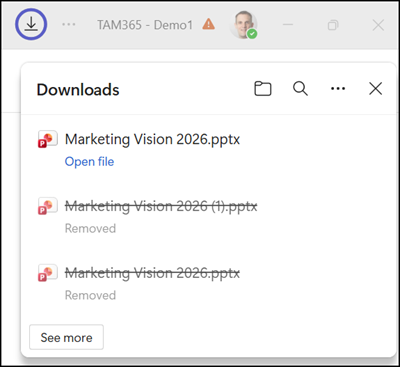
Download notifications now automatically disappear after about 4 seconds

Even though notifications clear out of the way much faster, you won’t lose track of your files. You can easily open or locate any downloaded item as soon as it finishes. To view the recent history, simply navigate to the Teams menu and select Downloads.
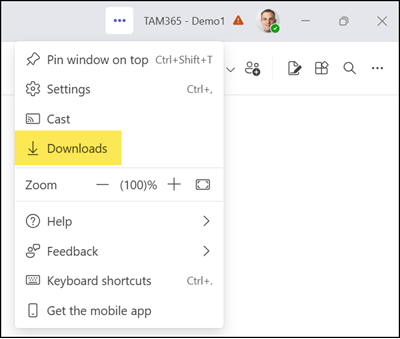
Open the updated file download manager

The updated file download manager is rolling out globally and should be available to all users on both the Teams desktop app and web client by the end of June 2026.

Avatar photo

Tobias Asböck

Tobias is a Senior System Engineer with more than 10 years of professional experience with Microsoft 365 products such as SharePoint Online, SharePoint Premium, OneDrive for Business, Teams Collaboration, Entra ID, Information Protection, Universal Print, and Microsoft 365 Licensing. He also has 15+ years of experience planning, administering, and operating SharePoint Server environments. Tobias is a PowerShell Scripter with certifications for Microsoft 365 products. In his spare time, Tobias is busy with updates in the Microsoft 365 world or on the road with his road bike and other sports activities. If you have additional questions, please contact me via LinkedIn or [email protected].

Leave a Comment
