
Microsoft added a new setting in Teams allowing users to disable file previews in their messaging experience.
Currently, when a file is shared in a chat or channel, the file preview appears automatically. This file preview was introduced in June 2024.
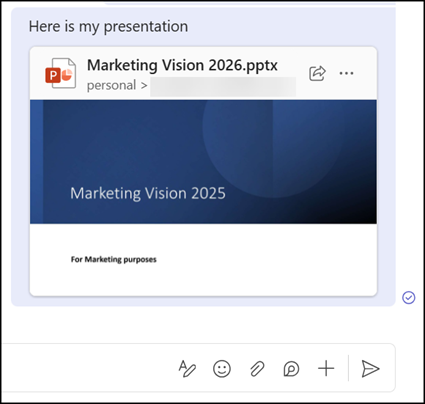
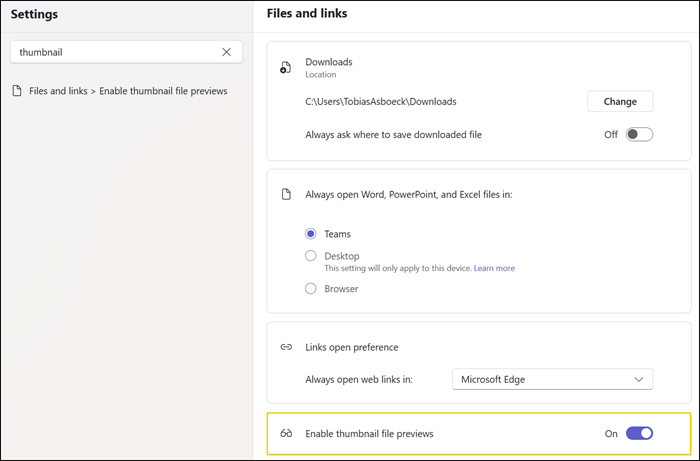
With this update, users will find a new option “Enable thumbnail file previews” in Teams Settings > Files and links to restore the pre-June 2024 experience. This setting is enabled by default, so nothing will change unless users choose to adjust it themselves.
Anyone who prefers a simpler, less visually busy chat feed can switch the setting off to prevent previews from appearing when files are shared, as was the case before June 2024.
This change is about giving users more control over how their Teams experience looks and feels, without affecting how files appear to anyone else, since the setting applies only to the user who changes it.
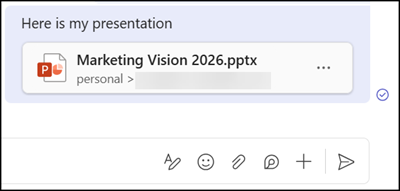
- The setting affects all thumbnail file previews, including previously shared and new files.
- The setting is stored locally for each version of Teams being used. If someone disables previews in their desktop app, they will need to do the same separately on other Teams clients.
The rollout should be completed by the end of June 2026 on Teams for Windows, Mac, and Web.
Updated 15 July 2026:
The rollout should be completed by the end of July 2026 on Teams for Windows, Mac, and Web.
