
The Teams admin center will receive a new alert rule notifying administrators when a new version of the Teams desktop client begins rolling out in their tenant.
- The new alert rule is disabled by default.
- This enhancement affects only Teams administrators, not end users directly.
- This enhancement is not related to the known 90-day servicing update rule, which causes users on Teams desktop clients more than three months old to see a blocking page.
Timeline
The rollout should be completed in June 2026.
How does this affect your Teams administrators?
Before this change, there was no native way to monitor when a new version of the Teams desktop client began rolling out across a tenant.
Now, Teams administrators find a new alert rule “Teams client update roll out” in the Teams admin center under Notifications & Alerts > Rules. The new rule is disabled by default until an administrator activates it.
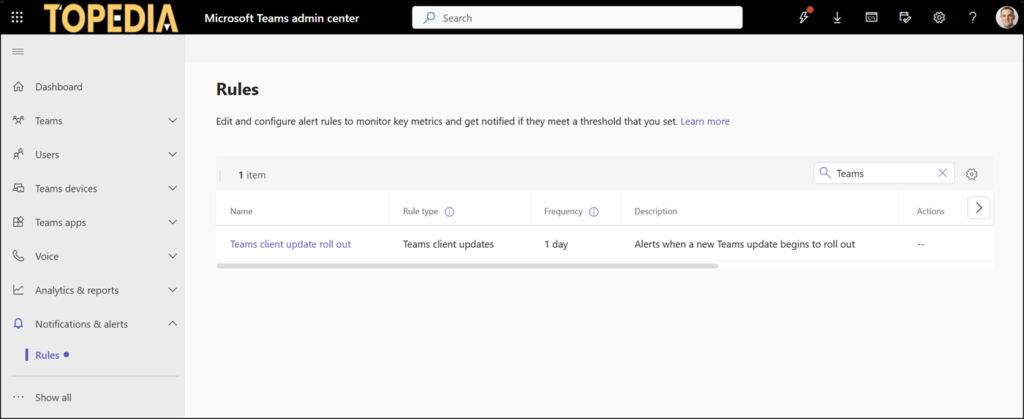
There are some options to configure it:
- Alert conditions, such as which release ring to monitor.
- The platform to monitor: Windows, Mac, VDI, or all of them.
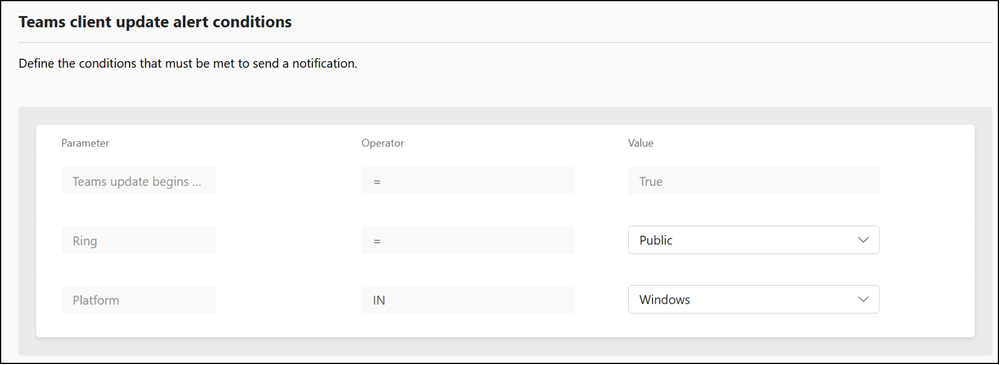
- The evaluation day is always set to 1.
- The notification action can be sent to a custom-defined teams channel, a newly created notification team, or an existing webhook for integration with external systems.
- Enabling or disabling the rule.
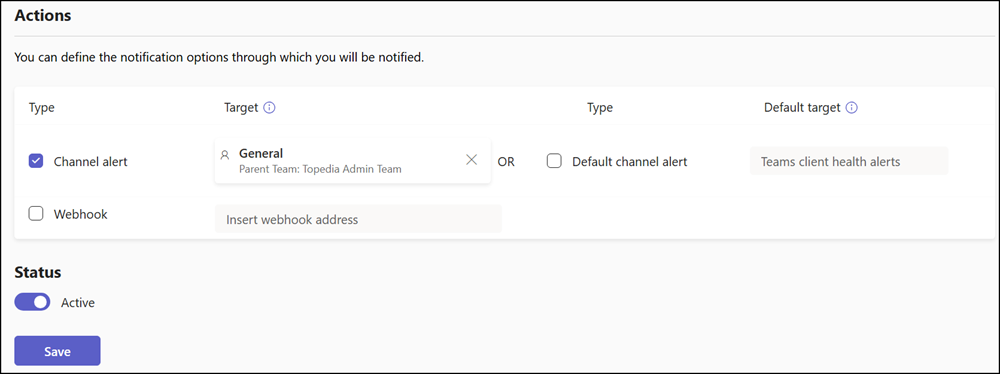
You should then monitor the Teams channel or webhook for upcoming rollout notifications.
