
For 11 months (since 17 July 2025), I have been working with Microsoft on a support case affecting multiple organizations because they enabled SharePoint license enforcement.
For reference, here are my previous posts:
- Members of Teams private channels have no access to the SharePoint site (August 2025)
- The root cause of SharePoint permission sync issues in Teams private channels explained (October 2025)
The root cause is the SharePoint tenant setting AllowUnlicensedUserAccess, which is set to False (enforcing SharePoint licensing). A private channel cannot sync guest accounts to the SharePoint site because the site requests a license from the guest account. Usually, a SharePoint license is not required for guest access.
My support contact informed me the management team of the SharePoint product group declined to fix this issue, as it’s not considered an issue as Microsoft defines it. If they decline, Microsoft will not fix it. Previously, my request to publish an official SharePoint advisory about the issue was also declined.
The reasons explained by Microsoft:
- In 2017, Microsoft updated the SharePoint tenant setting AllowUnlicensedUserAccess from False to True in all customer tenants. This setting is not officially available to organizations.
- Microsoft introduced Private Channels in Teams in November 2019. When Microsoft tested these channels, they used the default configuration AllowUnlicensedUserAccess = True, which means the default configuration works on their side, so there is nothing to fix.
- Microsoft also confirmed (and it’s confirmed by multiple contacts), multiple organizations (all organizations) with AllowUnlicensedUserAccess = False are affected by this issue. Some have raised support cases about it.
In 2018, a Microsoft Learn documentation described this situation.
AllowUnlicensedUserAccess = True was intended to allow new customers to migrate to SharePoint without licensing issues, but organizations were expected to request a change to False once SharePoint was in productive use. The documentation also stated organizations were not permitted to revert the setting after requesting the change from True to False. As expected, this documentation is no longer available to external visitors. I know the previous doc from 2018.
Microsoft Support now confirms organizations experiencing the private channel issue with guests can request a revert of the setting to True. An organization must ensure all internal users are officially licensed with a SharePoint plan.
Every internal user that you have is required to have a valid SharePoint Online license to access the SharePoint Online Service. The SharePoint Online user license provides the user with access to the full set of features available.
Microsoft recognizes assigning licenses to users that are synced to the Office 365 services is cumbersome for larger tenants, to alleviate this pain point, a change has been released to SharePoint Online that will allow users to access SharePoint Online even without license. This change does not, in any way, alleviate the license requirement for using SharePoint Online features for internal users.
Additionally, its possible to revert the SharePoint Online configuration to the previous experience where unlicensed users cant access SharePoint Online.
To request this change, speak with your Technical Advisor or escalate the case as per your regional process.
Microsoft Support
What Microsoft does not mention is the SharePoint people picker lists all users, regardless of whether they are licensed. With license enforcement, unlicensed users are not listed in the People Picker, and other license-based restrictions apply in SharePoint. These restrictions are not necessarily bad; they indicate the organization is on an aligned licensing path.
Organizations are free to set AllowUnlicensedUserAccess = False, but it is a non-default configuration, and they are responsible for finding workarounds for any product issues related to this setting. As a workaround for the current issue, Microsoft recommends adding guest accounts to the private channel site via the SharePoint admin center. This works, but it’s a manual or automated task and is not provided or supported by Microsoft.
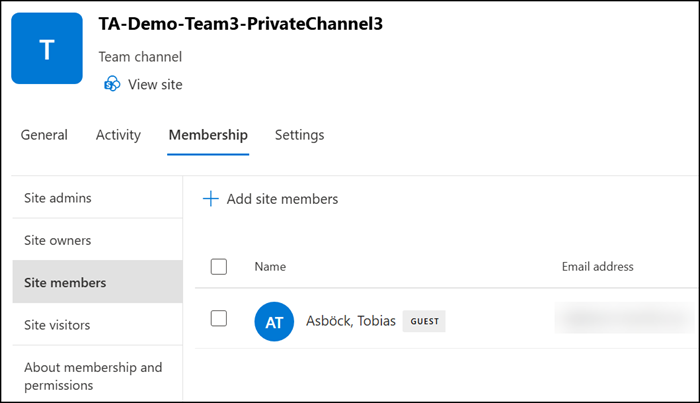
Alternatively, an organization can request a DCR (Design Change Request) to request a global change. Worth noting: this is not a hotfix or bug-fix request, as Microsoft does not consider it a bug.
In my work with Microsoft support cases, I have submitted DCRs, all of which were declined. Given our number of seats, I see no realistic chance of approval and will not request such a DCR (and I am also tired of this issue). If an organization has a large number of seats, the likelihood increases, but the required effort remains high.
My personal opinion:
Over the past 11 months, I have worked with three amazing support engineers who are genuinely customer-focused and clearly understand the issue. Either the SharePoint management team does not want to fix this issue, or the product group does not receive the resources from management to do so.
In my opinion, in the era of Copilot everywhere, fixing this issue has no financial benefit to Microsoft; it is simply an (annoying) effort with no productive outcome on their side.
Something worth keeping in mind:
Given the current announcement about enforcing OneDrive storage limits (see MC1310684, including the new, expensive OneDrive storage add-ons) and other changes to previously accepted but unenforced restrictions, I expect Microsoft will likely announce the enforcement of SharePoint licenses in the foreseeable future.
Then, you know, Microsoft will update the AllowUnlicensedUserAccess setting to False, including fixing the private channel issue for guest accounts (or they will require guest licensing in Entra External ID via a PAYG model, already implemented through the MAU billing model for organizations with a linked Azure subscription).
