
Audio Recap in Teams now supports additional languages, making it easier for users to access meeting summaries in their preferred language.
Audio Recap generates executive- or podcast-style recaps of meetings, giving users with a Microsoft 365 Copilot license a quick and convenient way to catch up on what was discussed without watching a full recording or reading through lengthy notes. Audio recaps are intended to be listened to on the go via the Teams Mobile app, but can also be listened to in a Teams desktop or web client.
Previously, audio recaps were automatically translated into English, even when the meeting was in German.
With this update, Audio Recap supports the following languages:
- Chinese
- English (US and UK)
- French
- German
- Italian
- Japanese
- Korean
- Portuguese
- Spanish
The rollout should be completed.
Users can now customize their audio recap with an executive- or podcast-style format in more languages. The experience remains the same as before, with broader language coverage.
Either in the updated Events app (soon with a dedicated Recap app)…
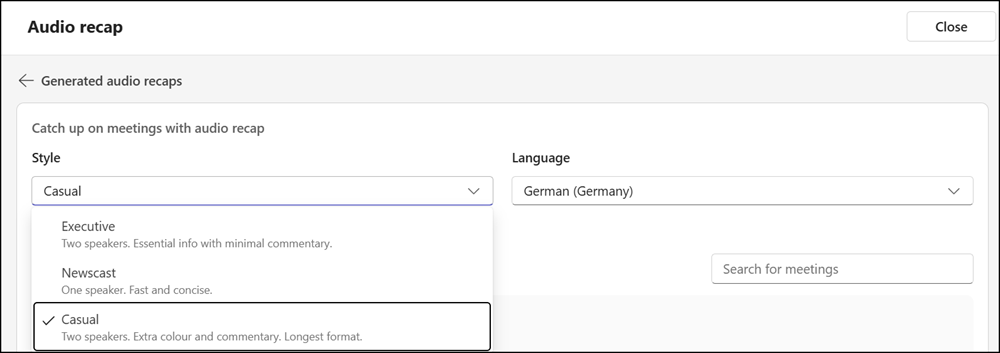
…or in the meeting recap via the Audio Recap option by selecting Customize.
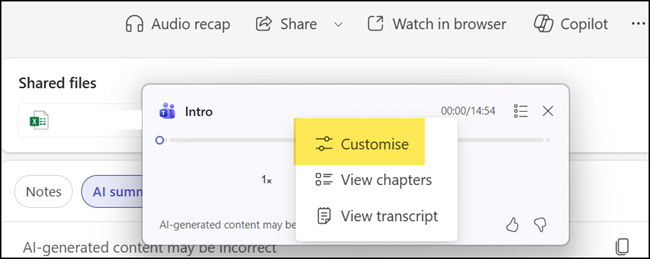
General notes related to audio recaps in Teams:
- Audio Recap is available to users with a Microsoft 365 Copilot license. It is not available to users with a Teams Premium license.
- Audio recaps are available in Teams Mobile and in Teams for Windows, Mac, and Web.
- Users can select up to 8 meetings to include in an audio recap.
- Audio recaps can be created from meetings held in the last 30 days.
- Audio recaps are stored in OneDrive in the Recordings > AudioRecaps folder for 60 days, and are then automatically deleted.
- By default, an audio recap is personal and not shared with other participants. Users can share the audio file in OneDrive. Recipients receive a limited copy via Clipchamp and cannot, for example, use chapters with the audio file.
