
RTMP-In allows Teams event organizers to stream their events directly from an external hardware or software encoder using the Real-Time Messaging Protocol (RTMP).
RTMP-In is available in Teams Meetings, Webinars, and Town halls. Note that organizers need a Teams Premium license to use RTMP-In in meetings, but not for webinar or town hall events.
The incoming RTMP feed must deliver:
- H.264 Advanced Video Coding (AVC)
- Constant Bitrate (CBR) for 720p or Constant Bitrate (CBR) and Variable Bitrate (VBR) for 1080p
- Frame rate of least 29.97 fps or 30 fps or higher
- Square Pixel Aspect Ratio (PAR)
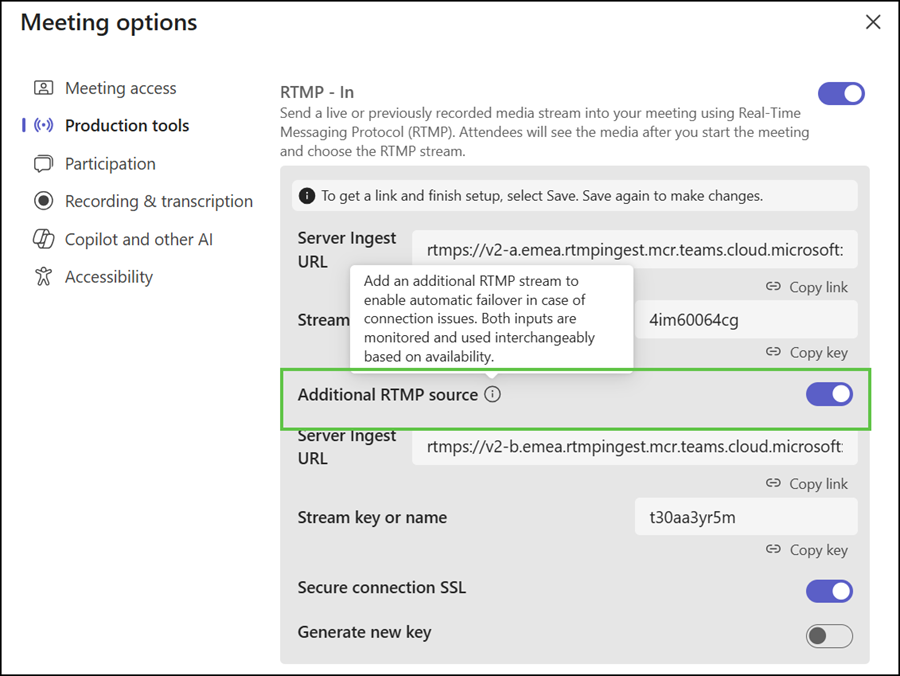
All event types now support a backup RTMP stream to keep a live broadcast running if the main stream is interrupted. Event organizers can find the backup stream in the event options as an additional RTMP source. Compared to before, it’s now an A and B stream.
RTMP-In must be enabled in a Teams meeting policy via the AllowedStreamingMediaInput setting.
AllowedStreamingMediaInput
Enables the use of RTMP-In in Teams meetings.
Possible values are:
- <blank>
- RTMP
Updated 19 May 2026:
The rollout should be completed in June 2026.
Updated 18 June 2026:
The rollout should be completed in July 2026.
Updated 8 August 2026:
The rollout should be completed in August 2026.
Updated 7 September 2026:
The rollout should be completed in September 2026.
