Microsoft is rolling out “Go to Folder” in the new Outlook and Outlook for the web, making it easier for users to navigate their mailboxes without scrolling through long folder lists. Instead of manually hunting through nested folder structures, users can now jump directly to any folder in just a few keystrokes.
“Go to Folder” is not a new feature; it has been available in Outlook Classic for a long time, but its absence in the new Outlook could prevent users from switching.
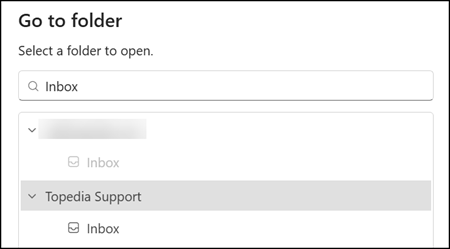
To use the feature in the new Outlook and Web, users can press CTRL+Y at any time or access Go to Folder through the context menu on their account. A small search interface appears, and typing just a few letters of a folder name is enough to filter results and navigate directly to the matching folder.
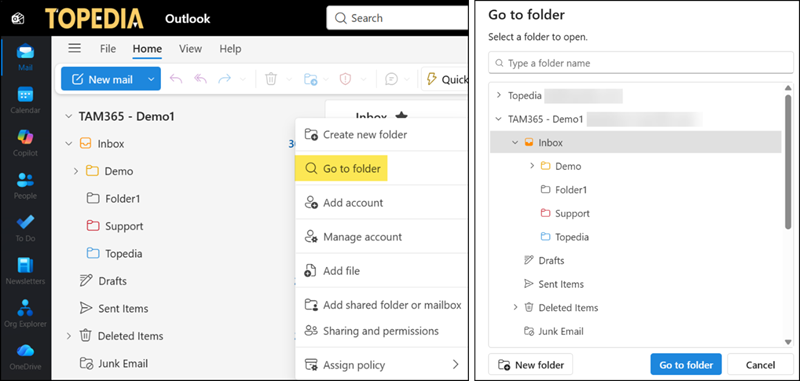
“Go to Folder” is particularly useful for users with complex folder structures or those managing multiple accounts with many subfolders, as the folder search covers all connected mailboxes, including shared mailboxes.
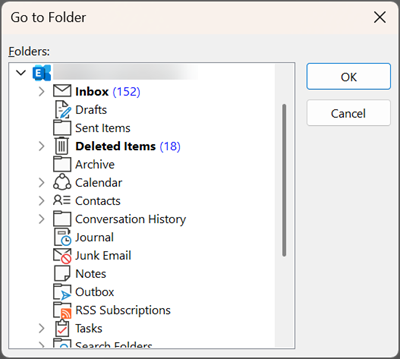
Users on Outlook Classic can also use the shortcut CTRL+Y to open the Go To Folder interface. Compared to the new Outlook, the interface in Outlook Classic has no folder search bar.