
Flex routing extends to Power Platform environments

As you probably read, Microsoft has implemented flex routing in Microsoft 365 Copilot for large language models. It is enabled by default unless administrators proactively disable it.

Flex routing lets customers in the European Union (EU) and the European Free Trade Association (EFTA) allow large language model (LLM) inferencing to occur outside the EU Data Boundary during periods of peak demand to help maintain a consistent Copilot experience.
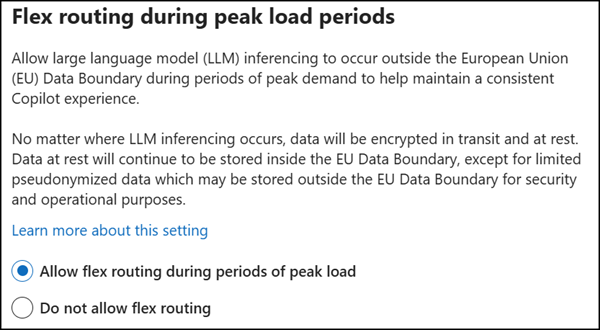
Flex routing in the Microsoft 365 admin center (the default setting)

This setting can now also be controlled in the Power Platform admin center, affecting Power Platform environments, Copilot Studio, and Dynamics 365.

Power Platform administrators find the setting per environment under Generative AI features.
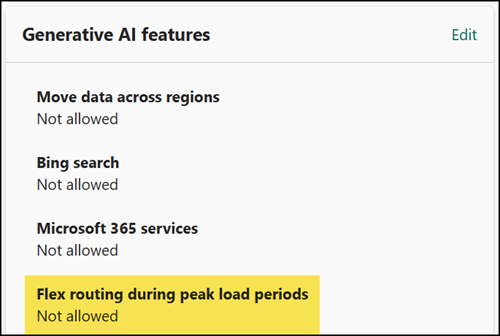
Flex routing in Power Platform environments
  • If flex routing is disabled in the Microsoft 365 admin center, the system enforces the setting to Power Platform. It is also disabled in all Power Platform environments.
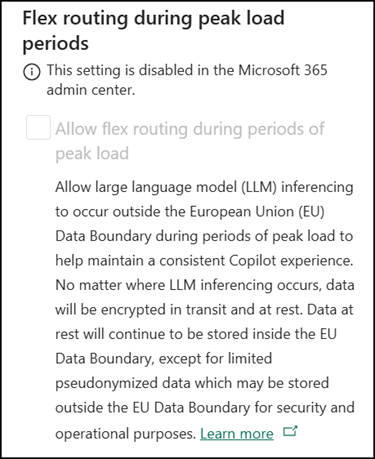
The Microsoft 365 admin center enforces the setting to Power Platform
  • If flex routing is not disabled in the Microsoft 365 admin center, Microsoft switches the Power Platform setting to on starting 4 May 2026. No data should have been processed outside the EU Data Boundary so far, and nothing should change until that date.

    In one of my test tenants with flex routing enabled in the Microsoft 365 admin center, the setting is already enabled by default in Power Platform environments. So you should review the setting in your environments.
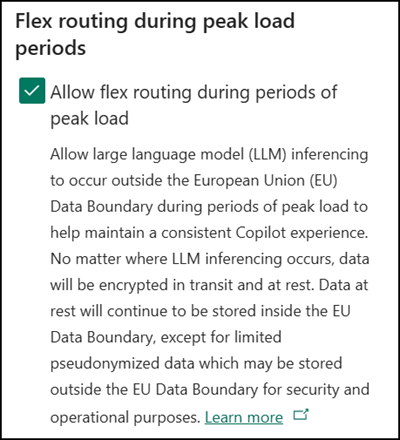
Flex routing is already enabled by default in Power Platform environments
Share
Avatar photo

Tobias Asböck

Tobias is a Senior System Engineer with more than 10 years of professional experience with Microsoft 365 products such as SharePoint Online, SharePoint Premium, OneDrive for Business, Teams Collaboration, Entra ID, Information Protection, Universal Print, and Microsoft 365 Licensing. He also has 15+ years of experience planning, administering, and operating SharePoint Server environments. Tobias is a PowerShell Scripter with certifications for Microsoft 365 products. In his spare time, Tobias is busy with updates in the Microsoft 365 world or on the road with his road bike and other sports activities. If you have additional questions, please contact me via LinkedIn or [email protected].

Leave a Reply

Your email address will not be published. Required fields are marked *
