
Since February 2025, Microsoft has been shortening some Teams meeting URLs to improve shareability and strengthen link security.
- This update is now rolling out to all Teams users, but only for Meet now meetings. Scheduled meetings continue to use the long URL format.
- This update also introduces an updated meeting URL lifecycle.
- This update applies to all Teams platforms, including desktop, web, mobile apps, and Teams devices.
Timeline
- The rollout for Targeted Release users was scheduled in February 2025.
- The rollout to all users should be completed by February 2026.
What is changing?
Previously, when you started a Meet now meeting in Teams, the URL looked similar to a scheduled meeting URL and was very long (the example below is shortened):
https://teams.microsoft.com/l/meetup-join/19%3ameeting_ZmQ3NzcxYWQtMTI4Mi00NjE3LTgwN2QtMDk3ZjQzYzRlNzgx%40thread.v2/0?context=….
Now, when you start a Meet now meeting, the generated URL is significantly shorter.
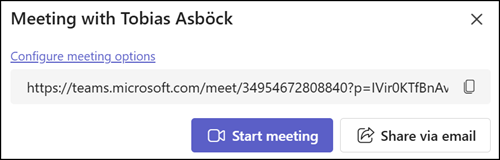
The updated URL syntax is: https://teams.microsoft.com/meet/<meeting_id>?p=<hashed_passcode>
Microsoft has removed the tenant ID, organizer ID, conversation ID, message ID, and other identifiers from the URL to reduce length and limit information exposure.
Updated meeting URL lifecycle
When this change is implemented in your tenant meeting URLs follow an updated lifecycle.
- Scheduled meeting URLs expire 60 days after the meeting ends. Updating the meeting before expiration extends the URL’s validity for another 60 days.
- Meet now meeting URLs expire 8 hours after creation.
If the meeting organizer’s account is deleted from the tenant, links to their scheduled meetings automatically expire.
After the meeting URL expires, users can no longer join the meeting using that link. Another user must recreate and reschedule those meetings.
Meeting links created before the introduction of short meeting URLs continue to work under the previous behavior and are not affected by the new expiration limits.
Important:
If your organization parses meeting URL parameters or reuses meeting URLs in internal tools, IT administrators must plan alternative approaches, such as using the Microsoft Graph meeting APIs.
