
The Interpreter agent is now becoming available for Teams Rooms on Windows devices with Teams Rooms Pro licensing. This capability provides real-time interpretation across up to nine languages, allowing participants to speak and listen in their preferred language. The feature includes an optional voice simulation capability for a more personalized meeting experience.
Content
Timeline
The rollout should be completed by February 2026.
Impact on your organization
The Interpreter Agent is rolling out to organizations using Teams Rooms on Windows with Teams Rooms Pro licensing.
Licensing and usage limits
Each Teams Rooms Pro license includes 20 hours of interpretation per room account per month. Usage beyond the included hours is subject to available capacity. The 20-hour allocation is reserved per Teams Rooms account and cannot be shared across multiple accounts.
Management and configuration
Interpreter Agent is managed through meeting policies, not the Teams Rooms Admin Portal. Unlike the Facilitator agent for Teams Rooms (which provides per-device control), there is no dedicated Interpreter setting within individual Teams Rooms device configurations.
While Microsoft has not yet updated the official Interpreter licensing documentation for the Teams Rooms extension, the requirements are expected to align with those of the Facilitator agent in Teams Rooms, which also requires Teams Rooms Pro licensing.
Based on the Facilitator in Teams Rooms licensing documentation, I expect Interpreter in Teams Rooms is for unscheduled, impromptu, or ad hoc in-person discussions.
To test the feature, enter the meeting room, start an ad hoc meeting via the meeting panel (or scan the QR code with your mobile device), and check language settings to verify Interpreter availability.
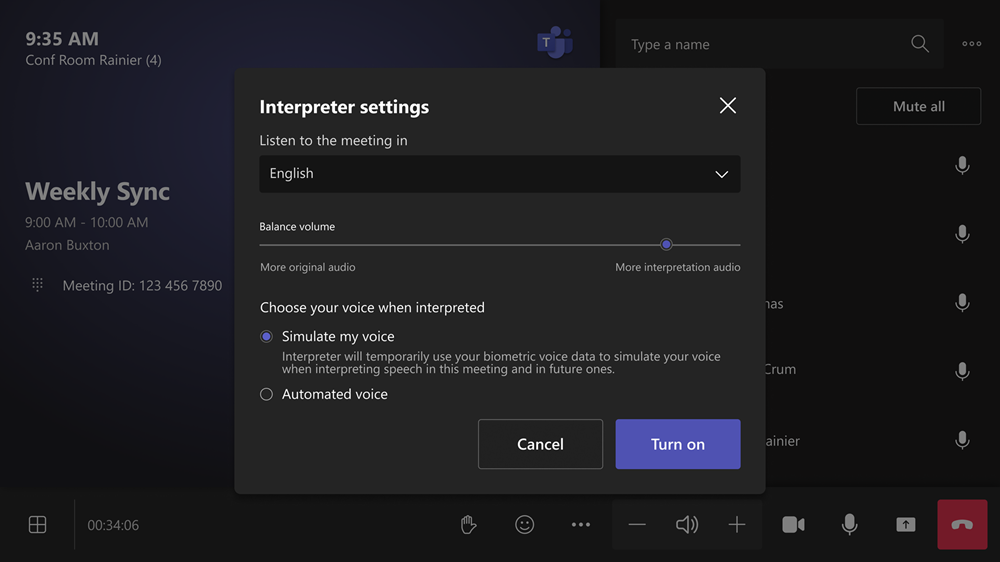
You can invite additional participants after an ad hoc meeting has started. For participants speaking one of the supported languages, the Interpreter agent provides near real-time translation into a selected language and can simulate their voice if enabled.
Supported languages
- Chinese (Mandarin)
- English
- French
- German
- Italian
- Japanese
- Korean
- Portuguese
- Spanish
Administrative considerations
Teams administrators should verify the meeting policy settings for Interpreter functionality, as Teams Rooms devices also use these configurations for Interpreter. The key policy settings to review are AIInterpreter and VoiceSimulationInInterpreter.
- AIInterpreter: Enables or disables the Interpreter agent (enabled by default)
- VoiceSimulationInInterpreter: Controls voice simulation capability (disabled by default)

To disable Interpreter for specific Teams Rooms accounts, assign them a meeting policy that disables the Interpreter feature.
