
Microsoft introduced Ask Copilot in Teams messages, a quicker way for users to get help from Copilot right from a message.
Instead of copying a message, pasting it into Copilot, and explaining the context, users can start directly from the message. With one action, the existing Copilot pane opens with the relevant content already included, so Copilot understands what the user is asking about from the start. “Ask Copilot” is available in 1:1 chats, group chats, and meeting chats, and channel threads across desktop, web, and mobile. A Microsoft 365 Copilot license is required.
Ask Copilot can save time and effort. Users often want a summary of a long message, a suggested reply, or an explanation of something a colleague wrote. “Ask Copilot” removes the manual steps, so users can go straight from reading a message to getting help with it.
Note:
Users may miss the option in channel conversations. “Ask Copilot” is available in channel threads, but not in a normal channel conversation. To find the Ask Copilot option, users must use the Thread layout and be in a thread.
Copilot Premium users have three options:
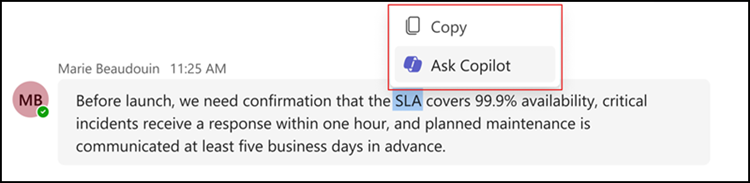
- In the Teams desktop app and Web: Users can select a piece of text within a message, right-click, and choose Ask Copilot. The Copilot pane then opens and uses only that selected text as its context.
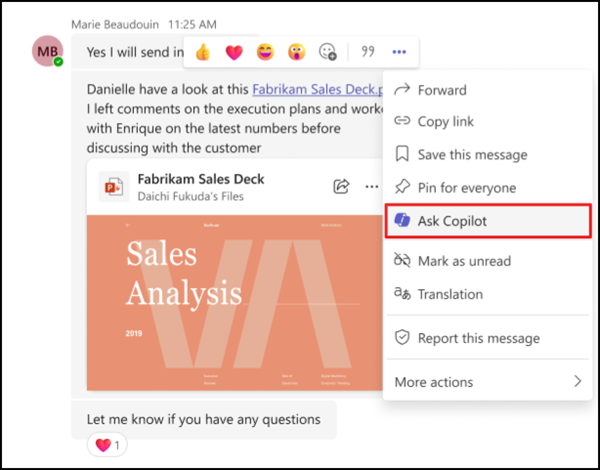
- In the Teams desktop app and Web: Users who want Copilot to work with a whole message can instead open the message actions menu and choose Ask Copilot there.
- In the Teams mobile apps for iOS and Android: Users press and hold a message and choose Ask Copilot from the menu that appears. Teams then opens the Copilot pane with the content of that message included.
The rollout of “Ask Copilot” should be completed in September 2026.
