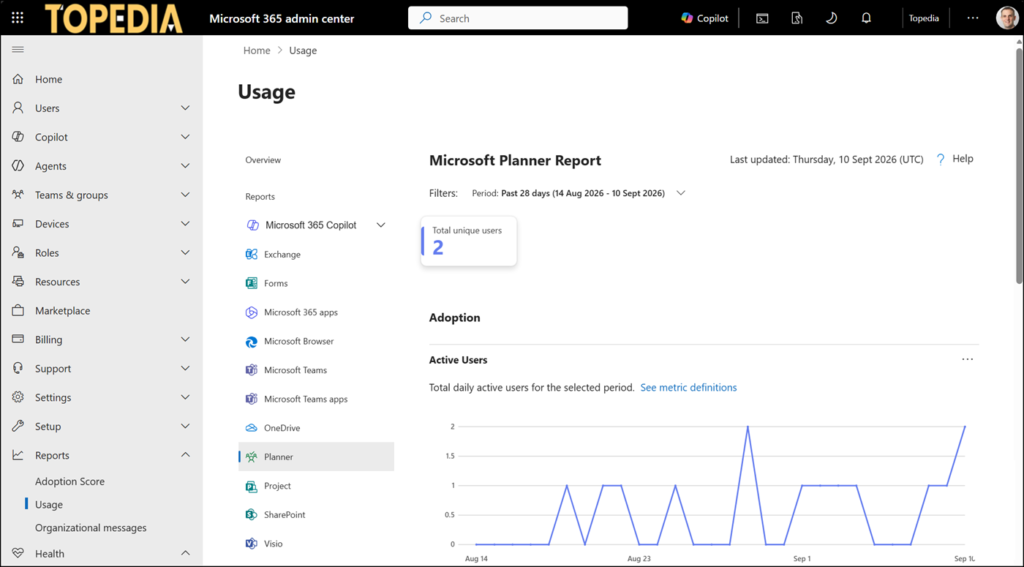
Microsoft has published a new Planner usage report in the Microsoft 365 admin center, giving administrators visibility into how internal and external users use Planner.
Administrators with the Reports Reader role (or an alternative role with the permission to read usage reports) find the new report in the Microsoft 365 admin center > Reports > Usage > Planner with the following information:
- Total unique users, showing the number of distinct active users over the selected reporting period (7, 28, 90, or 180 days).
- Daily active users trend chart for 7, 28, 90, or 180 days.
- Usage details by user account, listing individual users (including guest accounts) with their active days and last activity date.
This table lists everyone active within the previous 180 days, regardless of the reporting period selected. Changing the period only recalculates the active-days figures shown, not which users appear. Administrators can export the underlying data to CSV. - Usage is tracked across both Planner Basic and Planner Premium plans.
A user counts as active when they take a deliberate action in Planner, such as creating or editing a task, or opening the Planner application. Background refresh activity does not count towards these figures. Planner Agent activity is not included in Planner usage reports. These activities are reported in the Microsoft Copilot Agents report.
As always, usage reports are delayed between 48 and 72 hours. But don’t expect a Microsoft Graph API endpoint for this new Planner usage report.