
Microsoft is separating controls for Teams Events attendance and engagement reports from those for Teams Meetings. Teams administrators will soon be able to manage organizer access to attendance and engagement reports for events independently of the setting in Teams Meeting policies.
- This update applies only to Teams Events, such as Town Halls, Webinars, and Immersive Events. Attendance and engagement report settings for Teams Meetings remain unchanged.
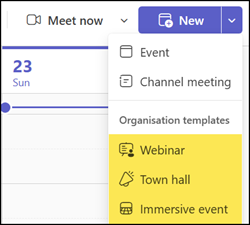
- Teams administrators should review and prepare their attendance and engagement reporting settings in Teams Events policies before the rollout. Teams Events policies will not inherit the current meeting settings.
Timeline
The rollout is scheduled for October 2026.
How does this affect Teams administrators?
Today, Teams Events inherit their attendance and engagement report behavior from Teams Meeting policies.
The following three settings are affected in meeting policies. Read the documentation for additional details.
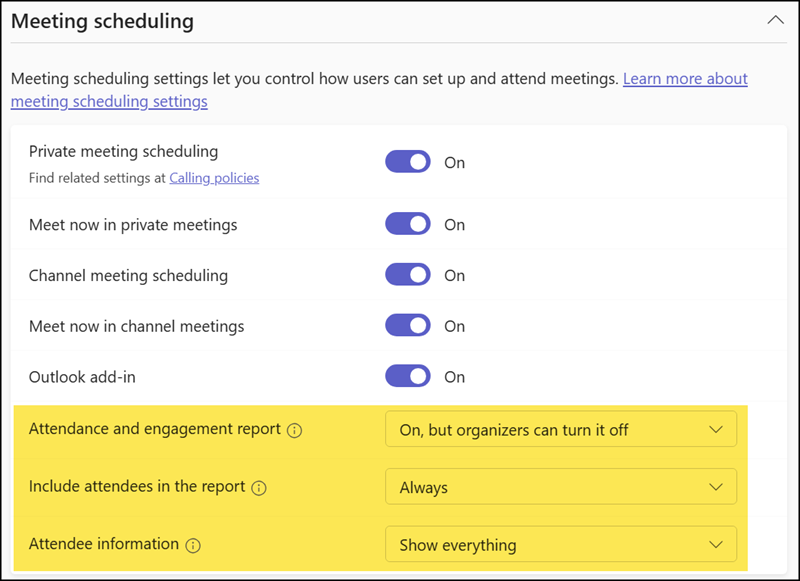
Or, with PowerShell, the following properties:
- AllowEngagementReport
- AllowTrackingInReport
- InfoShownInReportMode

With this rollout, event organizers’ access to attendance and engagement reports will instead be controlled by new settings in Teams Events policies, separate from the meeting policy settings.
Teams administrators should review the default configuration in their Events policies. According to Microsoft, Teams Events policies will not inherit the current meeting settings. The new report settings take effect in October 2026.
The two settings AllowEngagementReport and InfoShownInReportMode are already available in events policies and can be updated via PowerShell (not yet in the Teams admin center). The third setting, AllowTrackingInReport, is not available in events policies.
AllowEngagementReport
Controls whether attendance and engagement reports are allowed for events.
Possible values are:
- Enabled: On, but organizers can turn it off. This is the default setting.
- Disabled: Off, but organizers can turn it on.
- ForceEnabled: On. Organizers cannot turn off attendance and engagement reports.
- ForceDisabled: Off. Organizers cannot view or download attendance and engagement reports.
InfoShownInReportMode
Controls what information is shown in attendance reports.
Possible values are:
- FullInformation: Full attendee information is shown in the report. This is the default setting.
- IdentityOnly: Only attendee identity is shown in the report.

To update the settings:
Set-CsTeamsEventsPolicy -Identity "<PolicyName>" -AllowEngagementReport "<Enabled | Disabled | ForceEnabled | ForceDisabled>" -InfoShownInReportMode "<FullInformation | IdentityOnly>"