
Outlook Mobile now supports the Follow option for meeting invitations, giving users an easy way to stay in the loop on meetings they cannot attend. The Follow option was introduced in August 2024 for Outlook on the web and the new Outlook for Windows.
When a user chooses to follow a meeting, that user receives key updates and follow-up items afterward, and organizers may be prompted to record the meeting so those who could not join can catch up on what was discussed. This is especially useful for meetings a user is invited to but cannot realistically attend, helping everyone stay informed without needing to be present.
The Follow option appears as a new choice in the Outlook Mobile RSVP menu, alongside the existing response options. If the Follow option is available for the first time, users see brief information about what the new option is. The option is only available for meetings with two or more participants where the organizer has requested responses.
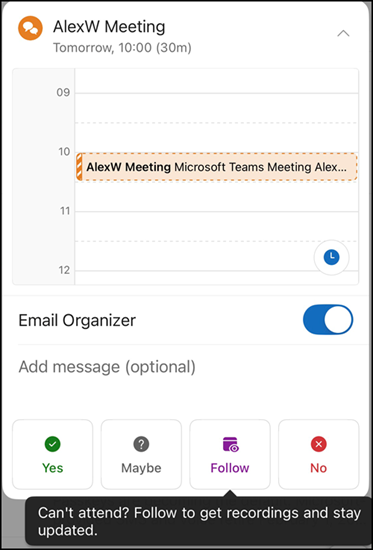
The Follow option will be available by default to all users with Outlook Mobile access, with the rollout scheduled by August 2026.
Notes:
- Outlook Classic does not support the Follow option. Users who want to use it should switch to a modern Outlook version.
- For meeting organizers using an Outlook version where Follow is not supported (such as Outlook Classic or Outlook on Mac), email responses are received from attendees who choose to follow the meeting. However, these attendees show as Tentative.
