
New side panel for task details in Microsoft Planner

Microsoft has added a new task details side panel to Planner, letting users view and edit task details without leaving their Board, Grid, or My Tasks view. The panel should reduce context switching and speed up task updates in Planner on the web and Planner in Teams.

Timeline

The rollout should be completed in August 2026.

How does this affect your users?

Users can now open task details in a side panel, keeping their main view visible while they work. Previously, task details opened in a dialog mode that covered the complete board.
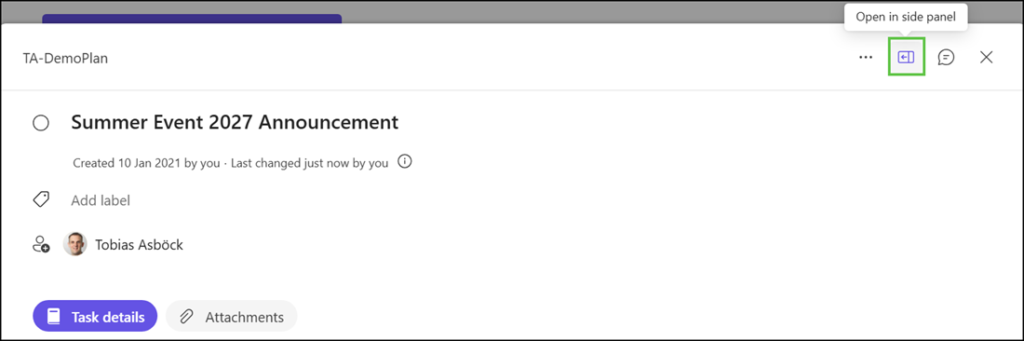
Open a task in a side panel from within dialog mode

The side panel supports the same fields as the dialog mode:
Assignees, due dates, status, notes, checklists, and attachments.
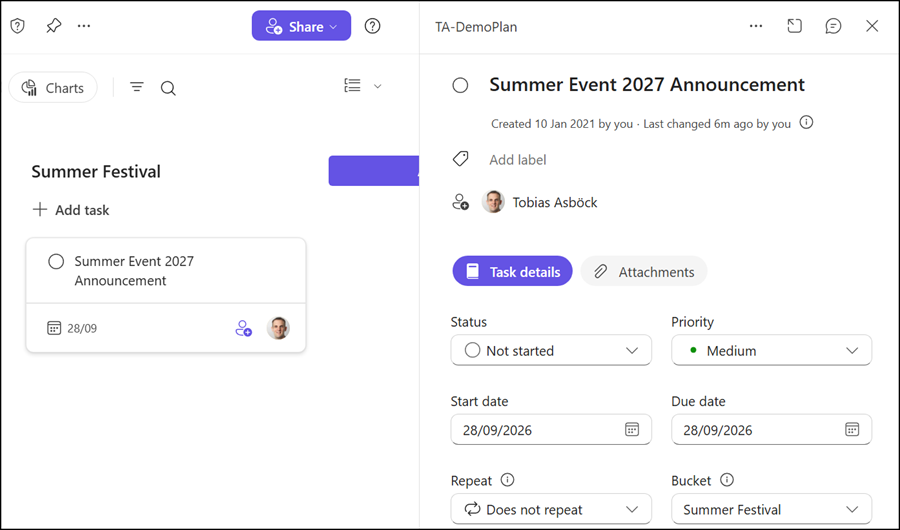
Planner task in the new side panel

Planner remembers each user’s preferred experience, side panel or dialog mode, across sessions.
Worth noting, Planner switches automatically to dialog mode on smaller screens, hiding the option for the new side panel.

Avatar photo

Tobias Asböck

Tobias is a Senior System Engineer with more than 10 years of professional experience with Microsoft 365 products such as SharePoint Online, SharePoint Premium, OneDrive for Business, Teams Collaboration, Entra ID, Information Protection, Universal Print, and Microsoft 365 Licensing. He also has 15+ years of experience planning, administering, and operating SharePoint Server environments. Tobias is a PowerShell Scripter with certifications for Microsoft 365 products. In his spare time, Tobias is busy with updates in the Microsoft 365 world or on the road with his road bike and other sports activities. If you have additional questions, please contact me via LinkedIn or [email protected].

Leave a Comment