
Microsoft has added a set of agentic Outlook Calendar capabilities, allowing Microsoft 365 Copilot to handle routine meeting decisions on the user’s behalf.
Traditional Copilot works reactively. A user asks something, Copilot responds, and the exchange ends there. Nothing happens unless the user initiates it.
An agentic Copilot differs by acting independently over time, based on rules or goals the user has set. Once a user gives it an instruction, Copilot continues applying the rule in the background without further user input. It monitors the relevant situation and takes action on its own. A few weeks ago, Microsoft described the agentic capabilities in Word, Excel, and PowerPoint.
Rather than manually reviewing every invitation, users can now give Copilot in Outlook ongoing instructions in plain language, for example, telling it to always accept meetings from a particular colleague when the calendar is free, or to automatically remove canceled meetings. Copilot then acts on those instructions continuously, without requiring users to review each case individually.
Microsoft describes some samples:
- Schedule a Copilot-managed 1:1 meeting: Schedule a weekly 1:1 with my manager for Monday afternoons. Reschedule when conflicts occur.
- Protect my time: Automatically follow all large meetings if they are outside my working hours, unless sent by my leadership team.
- Adjust my schedule: Reschedule all of my 1:1s with my direct reports for next week to the Friday afternoon that week.
- Draft an agenda: Create an agenda for tomorrow’s product launch standup. Focus on open blockers, owner assignments, and a go/no-go decision.
To get started, open Outlook Calendar in the new Outlook for Windows or the web version and select the Frontier mark above your calendar.
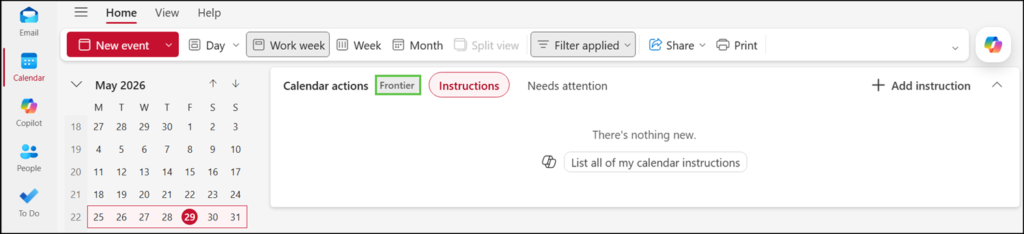
When Copilot takes an action, users can review what it did and why through a new activity history view.
Actions are grouped into categories (accepted, followed, declined, deleted), and each entry includes an explanation, so users should always know what happened to their calendar and can remain in control.
Outlook settings also include four predefined Copilot prompts. These prompts are passed to Copilot to return the relevant information to the user.
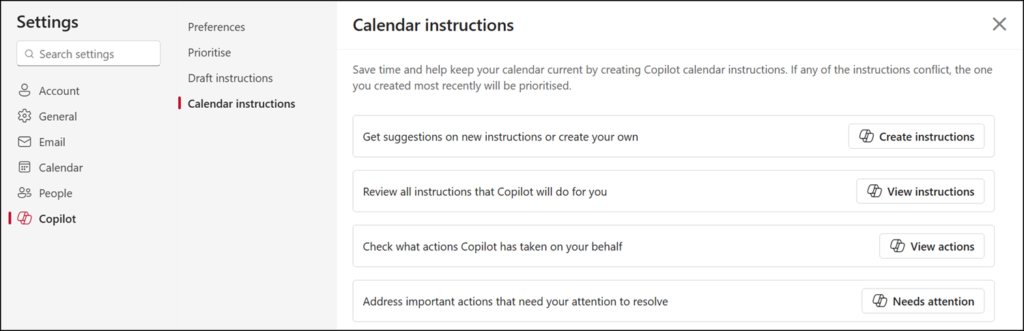
- Agentic Outlook Calendar capabilities are available to users with a Microsoft 365 Copilot license in the Frontier program who use the new Outlook for Windows or Outlook on the web.
- Copilot will only act on the signed-in user’s calendar and respect the working hours configured in Outlook.
