
Microsoft is rolling out an update to detect external meeting assistant bots attempting to join Teams meetings hosted by the organization.
- Meeting participants must now complete a second approval step to allow detected bots to join the meeting, improving awareness.
- Team administrators can configure a new meeting policy setting to update bot access tenant-wide or per user.
This update applies to meeting assistant bots joining from outside the hosting tenant and does not affect internally managed bots or Entra ID applications registered within your own organization’s tenant.
Timeline
The rollout should be completed in June 2026.
Updated 30 June 2026:
The rollout should be completed in July 2026.
Updated 12 August 2026:
The rollout should be completed in August 2026.
How does this affect your users?
Microsoft is introducing bot detection for Teams meetings. When an external meeting bot (primarily an AI assistant) attempts to join a meeting hosted by the organization, Teams should detect it and label the bot as a threat in the meeting lobby. Previously, such a bot was labeled as a normal meeting participant.
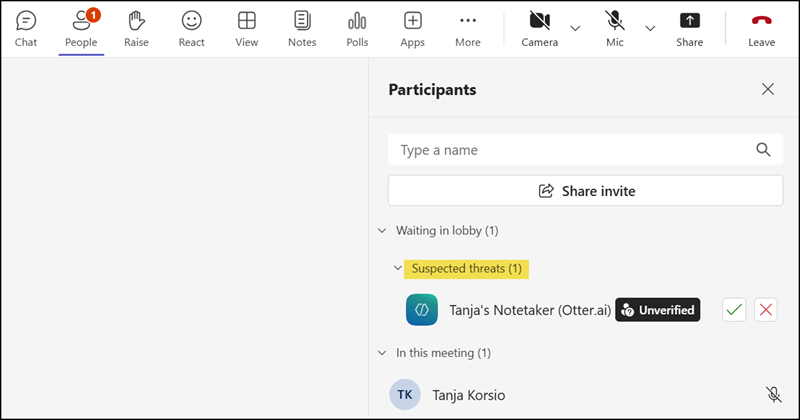
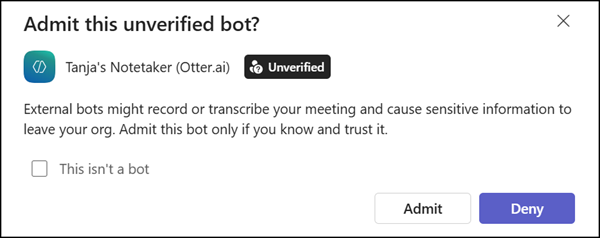
When a participant wants to approve the bot from the lobby, Teams now requires an additional confirmation step before the bot is admitted. This should give users more awareness it’s a bot that may record sensitive meeting information.
An approved bot remains marked as an unverified participant after being admitted from the lobby.
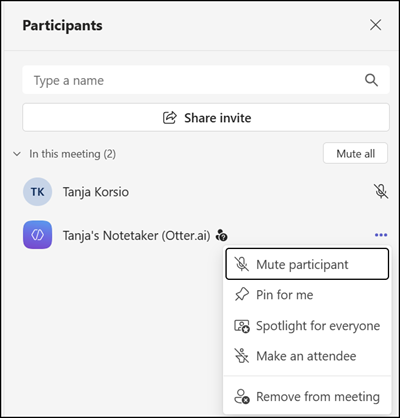
Users are also encouraged to report bots that Microsoft has not yet identified as such. Undetected, external bots can be reported directly from the participants’ panel, which should help improve detection accuracy over time.
How does this affect your Teams administrators?
Bot detection is enabled by default for all tenants. A Teams administrator can update the ExternalBotAccessMode setting in meeting policies, including the option to block all detected bots from joining meetings entirely.

ExternalBotAccessMode
Controls how external third-party automated bots and meeting assistants are handled when they attempt to join meetings. This policy provides predictable behavior and helps organizers apply intentional control for bot participation.
Possible Values:
- AllowAllBots: Don’t detect bots; allow them to join meetings directly.
- RequireApprovalWhenDetected: When detected, require approval before joining by routing detected bots to the meeting lobby. This is the default value.
- BlockDetectedBots: Block detected bots from joining meetings.
Set-CsTeamsMeetingPolicy -Identity "Global" -ExternalBotAccessMode <AllowAllBots | RequireApprovalWhenDetected | BlockDetectedBots>