
Collaborative Notes, powered by Loop, are now rolling out for instant (Meet now) meetings in Teams.
- Collaborative Notes require Loop to be enabled in your SharePoint tenant.
- Collaborative Notes are not available for Teams calls.
Timeline
The rollout should be completed between April and July 2026.
Updated 29 July 2026:
The rollout should be completed by August 2026.
How does this affect your organization?
In November 2025, Microsoft introduced Collaborative Notes in Teams Chats powered by Loop, with the confusing SharePoint Embedded container name IC3_TeamsContainerType.

With the current rollout, all users participating in instant meetings in Teams will have access to a Notes button in the meeting controls. Notes open in a right-side pane to prepare a collaborative note, and can also be opened in the browser via the Loop web app. Collaborative notes are also available in the meeting recap.
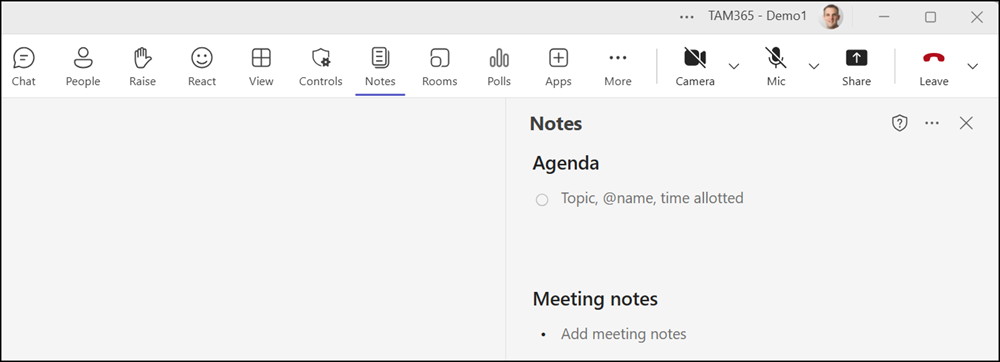
Notes are Loop components and stay in sync across Teams and the Loop app. Users can co-author agendas, capture notes, and assign tasks. Tasks created in meeting notes sync with Planner as a Planner Lightweight plan.
The Collaborative Notes from instant meetings are stored in OneDrive in the Meetings folder.

- Collaborative Notes are enabled if the SharePoint tenant setting IsCollabMeetingNotesFluidEnabled is enabled.
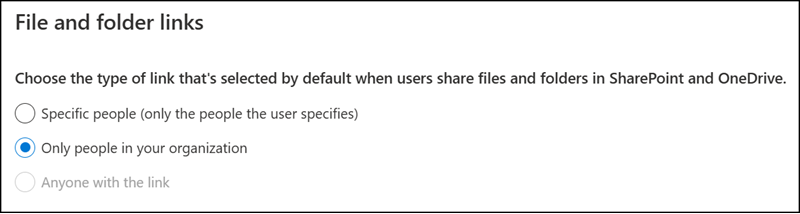
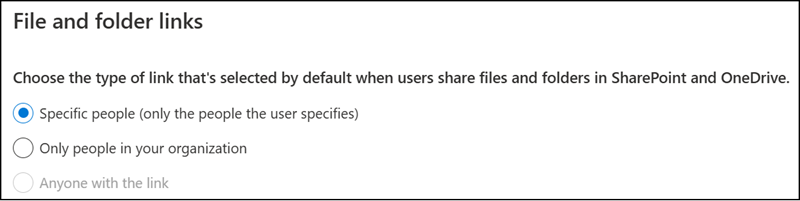
- Sharing behavior depends on your organization’s default link type configuration:
- Company Shareable Link (CSL): Generated by default unless overridden. Anyone in the organization can access the notes.
- People Specific Link (PSL): If PSL is set as your tenant default, access is limited to users on the original meeting invite. Users added via forward or nudge will need to request access.
- Collaborative Notes are not available for Teams calls.
