
Microsoft is preparing the Microsoft eCDN add-on for Enterprise customers alongside a new Teams Events service plan.
Both service plans are available in Enterprise suites (such as Microsoft 365 E3 / E5) and Microsoft Teams Enterprise licenses, but neither is included in Microsoft 365 Business licenses. Microsoft has also confirmed Teams Events is intended for E-class licenses, so you can expect the same for eCDN.
You will find these two new service plans:
- Microsoft Teams Events
- Microsoft eCDN
In some cases, the service plans are still in a pending provisioning state, meaning they are awaiting final activation by Microsoft.
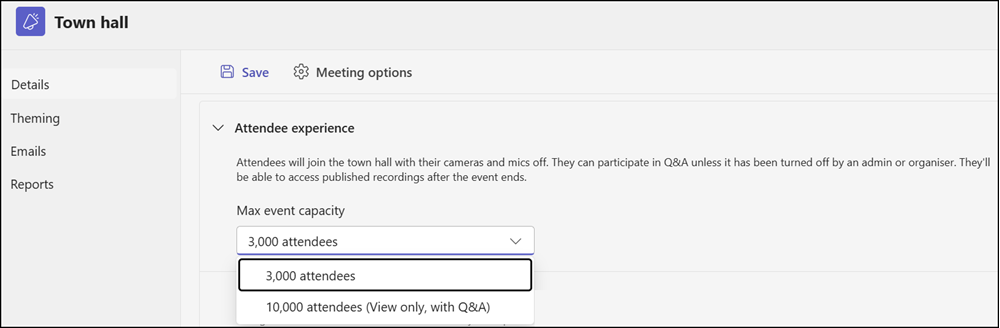
These service plans are related to the January announcement that, from 1 April, all users with a Teams Enterprise license can schedule Teams Events (currently available for Town Halls) with up to 3,000 interactive or 10,000 view-only attendees.
Microsoft eCDN is also being added to all Teams Enterprise licenses, having previously been available only as a standalone add-on or as part of Teams Premium Legacy.
Look for the following service plans.
Microsoft Teams Events
This service plan is required to schedule Town Hall events with up to 3,000 interactive or 10,000 view-only attendees. Check the Teams Events policy to restrict who can schedule Town Hall events.
- servicePlanName: MICROSOFT_TEAMS_EVENTS
- servicePlanId: 29c62f1c-8ffc-4304-9cb9-398a6aa1852b
Microsoft eCDN
This service plan is part of the tenant and cannot be disabled. It was previously included in Teams Premium Legacy.
- servicePlanName: MICROSOFT_ECDN
- servicePlanId: 85704d55-2e73-47ee-93b4-4b8ea14db92b
Microsoft eCDN is now enabled by default for all Town Hall events for users with a Teams Enterprise license if the service plan is active in your tenant.
Microsoft eCDN is enabled by default for all Town Halls regardless of size/capacity. Any user with an Enterprise-class license (for example, E3 or E5) can schedule and host interactive (reactions, polls, hand raises, streaming chat) Town Halls up to 3,000 attendees or up to 10,000 attendees in view-only mode (view-only experience plus Q&A) without any add-ons. Both options will have Microsoft eCDN included by default. You do not need to enable Microsoft eCDN separately.
Below is a short export from a Microsoft Teams Enterprise license, Product ID CFQ7TTC0MZJF. These service plans are also included in Enterprise suites that include Teams.
You should verify the provisioningStatus via PowerShell or Graph Explorer. A status of Success indicates the tenant is ready to use the features. The SKU details are for my reference.
[
  {
    "servicePlanName": "MICROSOFT_TEAMS_EVENTS",
    "servicePlanId": "29c62f1c-8ffc-4304-9cb9-398a6aa1852b",
    "appliesTo": "User",
    "provisioningStatus": "Success",
    "skuPartNumber": "Microsoft_Teams_EEA_New",
    "skuId": "7e74bd05-2c47-404e-829a-ba95c66fe8e5"
  },
  {
    "servicePlanName": "MICROSOFT_ECDN",
    "servicePlanId": "85704d55-2e73-47ee-93b4-4b8ea14db92b",
    "appliesTo": "Company",
    "provisioningStatus": "Success",
    "skuPartNumber": "Microsoft_Teams_EEA_New",
    "skuId": "7e74bd05-2c47-404e-829a-ba95c66fe8e5"
  }
]
Hi Tobias
Thank you for this write up. How can I assign these features to just couple of pilot users?
Hello Abdul, to restrict Town Hall scheduling, disable it in your global Events Policy, then create a custom Events Policy with Town Halls enabled and assign it to the relevant users or groups. The property is AllowTownhalls. Microsoft’s setup guide covers the steps in detail: Manage who can schedule and attend town halls in Microsoft Teams