
A new Copilot drafting experience in Outlook

Microsoft 365 Copilot is getting a new side-by-side drafting experience in Outlook, making it easier for users to go from a blank message to a finished email without leaving the compose window.
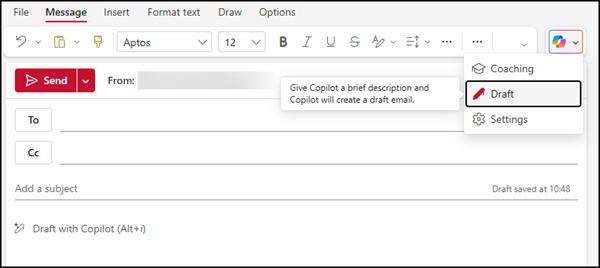
Using the old Draft experience in Outlook

Instead of generating a single draft and working with it in isolation, users can now chat with Copilot directly alongside the message they are writing, refining, expanding, or rewriting content in real time through back-and-forth interaction, while remaining in full control of what gets sent.

Like the old Draft experience, the new experience is available to users with a Microsoft 365 Copilot license.

Click the “Help me write” inline option in an email, or verify that the Outlook source (Edit with Copilot) is active in Copilot Chat.
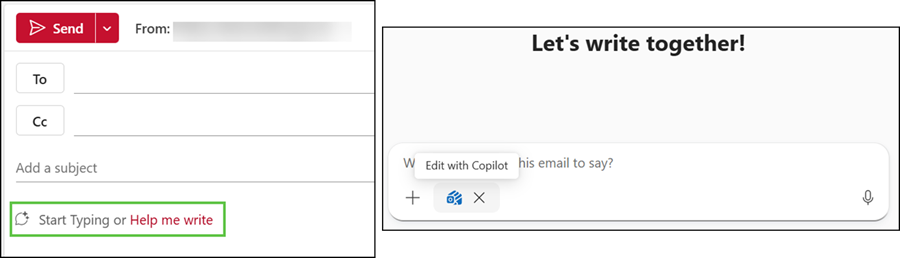
Select "Help me write" to open the new Copilot drafting experience
Select “Help me write” to open the new Copilot drafting experience

Copilot will prepare and update a draft based on your prompts.
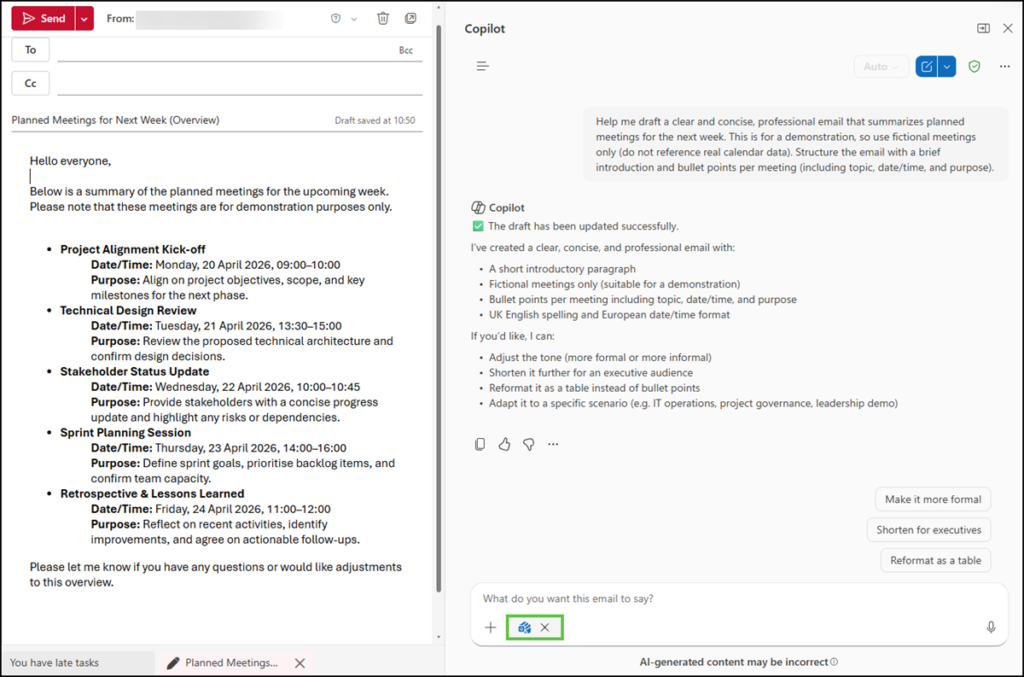
The new Copilot drafting experience in Outlook
  • The rollout should be completed in April 2026 for Outlook on the web and the new Outlook for Windows.
  • Outlook for iOS, Android, and Mac will follow after the Outlook Web and Windows rollout.
  • Outlook Classic is scheduled for later in 2026.

Share
Avatar photo

Tobias Asböck

Tobias is a Senior System Engineer with more than 10 years of professional experience with Microsoft 365 products such as SharePoint Online, SharePoint Premium, OneDrive for Business, Teams Collaboration, Entra ID, Information Protection, Universal Print, and Microsoft 365 Licensing. He also has 15+ years of experience planning, administering, and operating SharePoint Server environments. Tobias is a PowerShell Scripter with certifications for Microsoft 365 products. In his spare time, Tobias is busy with updates in the Microsoft 365 world or on the road with his road bike and other sports activities. If you have additional questions, please contact me via LinkedIn or [email protected].

Leave a Reply

Your email address will not be published. Required fields are marked *