
Exchange Online includes a new OWAMailboxPolicy setting that lets administrators control whether file attachments are accessible when users work offline in the new Outlook for Windows.
- The new setting is enabled by default.
- If offline mode is already disabled via an OWAMailboxPolicy in the new Outlook for Windows, the new setting has no impact.
- The new setting applies only to the new Outlook for Windows and has no impact on Outlook on the web or Outlook Classic.
Timeline
The rollout starts in April 2026.
How does this affect your organization?
In August 2025, Microsoft added support for storing attachments in offline mode in the new Outlook for Windows, with the option enabled by default.
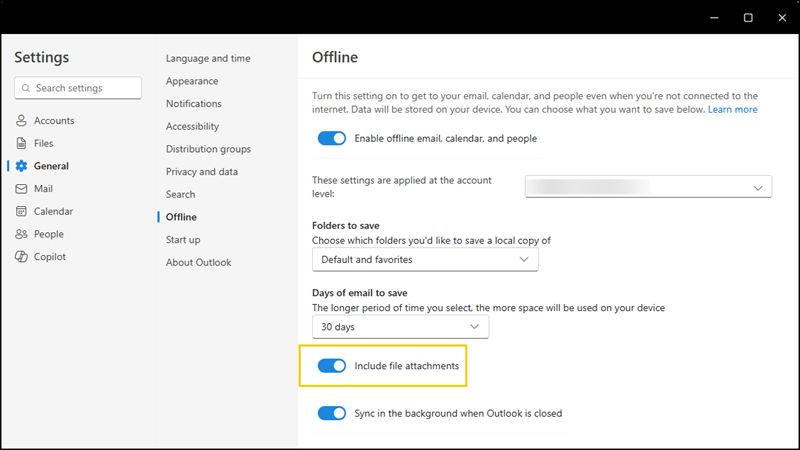
Microsoft has introduced a new OWA policy setting AttachmentsOfflineEnabledWin. It is enabled by default, meaning users will continue to have access to file attachments while offline unless an Exchange administrator explicitly disables it.

The setting works in conjunction with the existing OfflineEnabledWin setting:
If offline mode itself is disabled, attachments remain inaccessible regardless of the value of AttachmentsOfflineEnabledWin.
Microsoft published a table summarising the combined behavior of both settings:
| OfflineEnabledWin | AttachmentsOfflineEnabledWin | Description |
|---|---|---|
| $true | $true | Offline mode is fully enabled (default configuration) |
| $true | $false | Offline mode is enabled, but attachments are inaccessible |
| $false | $true | Offline mode is disabled, attachments are also inaccessible |
| $false | $false | Offline mode is fully disabled |
Exchange administrators should review their OWA policies and restrict access to offline attachments where required.
