
Microsoft is changing the Profile Card experience in Outlook Classic. The expanded profile card view will be retired. This change should align Outlook Classic with other Microsoft 365 apps that already use the standard contact card.
- Microsoft recommends using the new Outlook for Windows for the full (modern) profile card experience.
- Microsoft also advises informing users about the change, as they may actively look for the expanded profile card.
Timeline
The retirement is scheduled for June 2026.
Updated 5 June 2026:
The retirement is currently paused/postponed.
Updated 15 September 2026:
Microsoft has canceled this scheduled retirement, so nothing will be changed.
What is changing?
Currently, users can expand the Microsoft 365 Profile Card in Outlook to view an account’s full profile (the expanded contact card).
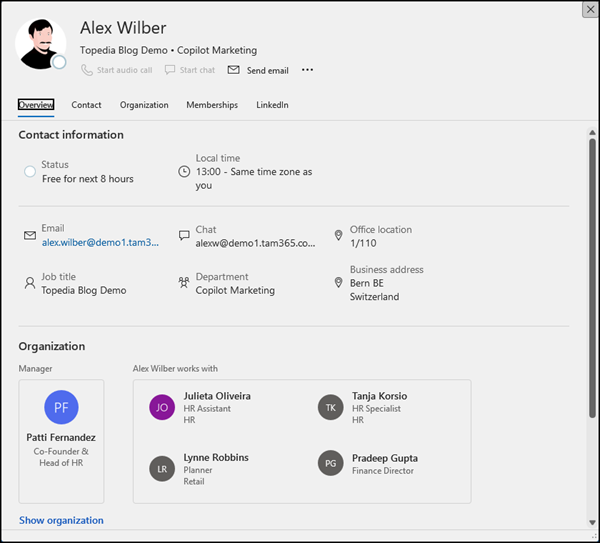
Starting in June 2026, Microsoft will retire the expanded contact card, leaving only a standard contact card in Outlook Classic. The standard card provides reduced information about the user’s profile.
The standard card can be opened by hovering over a recipient, right-clicking and selecting Open contact card, or double-clicking a recipient.
Compared to the expanded card, the standard contact card omits the local time display, the “Works with” section in the organization chart, and the option to change a profile picture directly from the card. Changing a profile photo is still possible in Outlook for Windows via the File menu (if not prevented by the organization), using the Change link beneath the photo.
As Microsoft notes, the standard contact card is already available in the Word, Excel, and PowerPoint desktop apps. To preview the upcoming Outlook Classic card, add a comment and hover over the author name to see the reduced contact card.
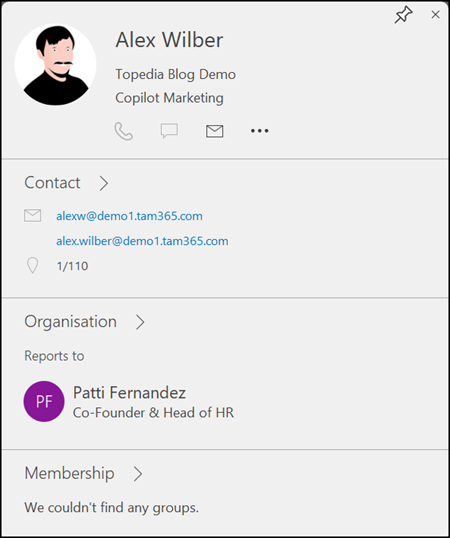
For users who rely on information not available in the standard contact card, Microsoft recommends switching to Outlook on the web or the new Outlook for Windows.
