As announced in February, Microsoft is now rolling out the small but noticeable visual change to the Teams app bar.
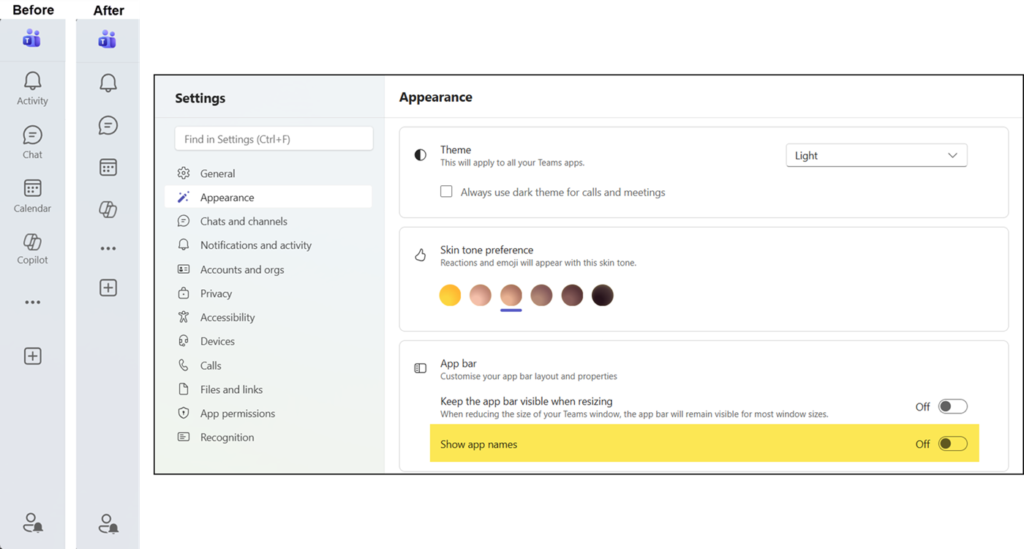
The vertical strip of icons on the left side of the Teams window will no longer display app names next to their icons by default, leaving only the icons themselves visible. This should give the app bar a tidier, less cluttered appearance without removing any functionality.
Users who want to know which app an icon represents can simply hover over it with their mouse or navigate to it using the keyboard, and a tooltip will appear showing the app name, as it has worked in the past.
Users who prefer to see app names displayed permanently can enable this at any time in Teams Settings > Appearance, where there is an option to show app names in the app bar. This option is off by default and cannot be changed by an administrator. Each user can adjust this individually according to their preference.
- The update applies to all Teams users in commercial tenants.
- The update is not rolling out to education tenants.
- The rollout should be completed in late April 2026.