Microsoft is expanding People Skills in Teams. Skills will appear directly on the Microsoft 365 profile card in Teams, helping employees discover colleagues’ expertise and manage their own skills without leaving their current task.
This change only affects organizations that have People Skills configured and where users have set their skills or skills were provided via AI.
Timeline
The rollout should be completed in April 2026.
What is changing?
People Skills provides a shared skills taxonomy on the Microsoft 365 profile card.
For users with a Microsoft 365 Copilot, Microsoft Viva Premium, or Microsoft 365 E3/E5 license, People Skills uses AI-powered skill inferencing based on Microsoft Graph signals to suggest and maintain personalized skills profiles. AI-powered skill inference is on by default when People Skills is configured and the tenant includes at least one Microsoft 365 Copilot license.
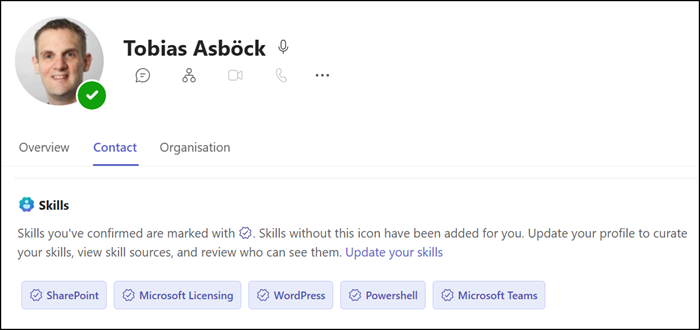
As on profile cards in Microsoft 365 People Search, a new Skills section now appears on the Microsoft 365 profile card in Teams.
Users can quickly view colleagues’ skills to identify expertise and connect with the right people, and access and manage their own skills profile directly from the profile card in Teams. For now, skills are for information only and cannot be clicked or searched to find colleagues with the same expertise. Microsoft plans to integrate People Skills into Copilot Search.
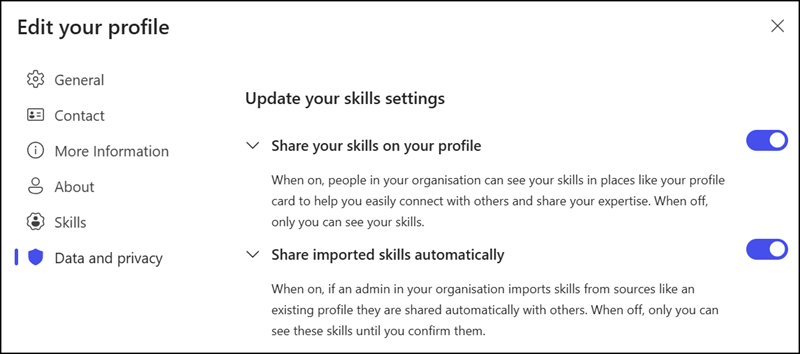
Users can control whether their skills are visible on their profile card.
Additional privacy options are available for users with a license above People Skills Foundation, including control over AI-powered skills.
For administrators:
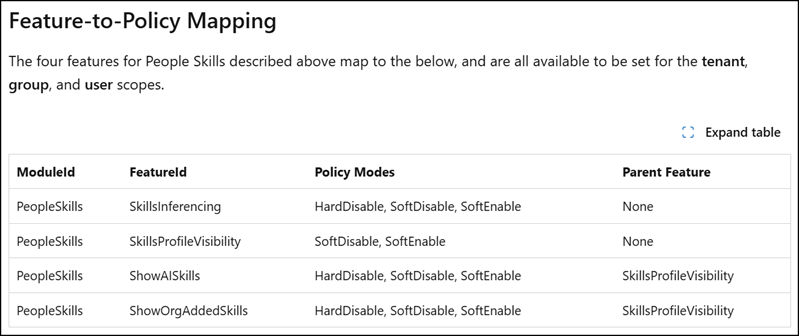
Users with the Knowledge Administrator role can preconfigure People Skills privacy settings using three values:
- SoftEnable: Feature is available and on by default; users may opt out. This is the default setting for all People Skills features.
- SoftDisable: Feature is available but off by default; users may opt in.
- HardDisable: Feature is fully disabled, and users cannot opt in.