
Microsoft is expanding user reporting for suspicious and non-suspicious (false positive) blocks in Teams messages to organizations licensed for Microsoft Defender for Office 365 Plan 1. Previously, both capabilities were limited to Plan 2.
Reporting suspicious Teams messages helps security teams identify and investigate potential phishing, malware, and spam across Teams chats, channels, and meeting chats, including both internal and external conversations.
This update respects existing User reported settings in Defender for Office 365 and only extends the licensing requirements.
Timeline
The rollout should be completed in February 2026.
What is changing?
Currently, reporting suspicious Teams messages and the recently introduced option to report non-security risks (false positives) require a Defender for Office 365 Plan 2 license.
January 2026:
In organizations with Microsoft Defender for Office 365 Plan 2 or Microsoft Defender XDR, admins can decide whether users are allowed to report messages in Microsoft Teams.
Starting in February 2026, Microsoft will make both features available with Defender for Office 365 Plan 1.
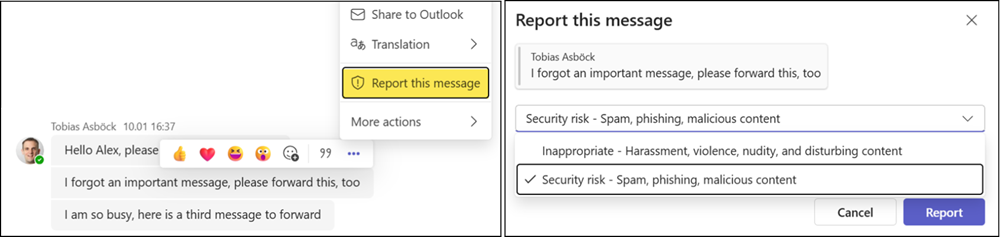
Users can select “Report this message” in Teams chats, channel conversations, and meeting chats to report a potential security risk.
- User-reported messages are enabled by default in new tenants. In older tenants, this feature is disabled and must be enabled manually by a Defender administrator.
- User reporting of Teams messages is not supported in US government tenants, including GCC, GCC High, and DoD.
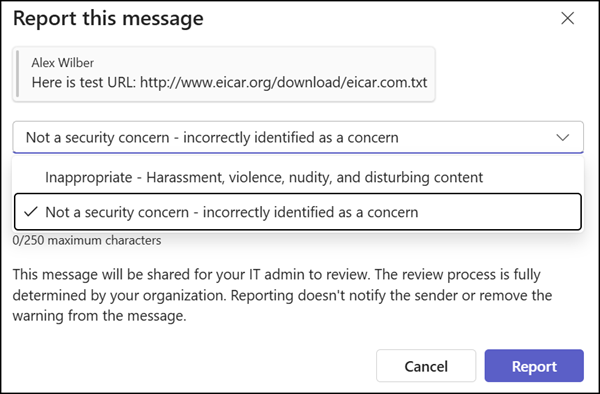
The same applies to reporting non-security risks, unless disabled by a Teams administrator (it is enabled by default). The enhancement for non-security risks has been rolling out since 12 January.
All submissions appear on the User reported page in the Defender portal and/or in the configured mailbox destination.
Teams administrators should review their current configuration in the Teams admin center or manage it via PowerShell.
The relevant PowerShell settings are:
- AllowSecurityEndUserReporting in your Teams messaging policy, together with the User reported settings in the Defender portal. Reporting toggles in the Teams admin center are automatically enabled when User reported settings are turned on in the Defender portal.
- ReportIncorrectSecurityDetections in your Teams messaging configuration.
AllowSecurityEndUserReporting
This setting determines whether users can report any security concern in a Teams message to their administrator. Possible values: True, False
ReportIncorrectSecurityDetections
This setting enables end users to report incorrect security detections in Teams messages within the tenant.
Possible values:
- Enabled (default)
- Disabled
