
Microsoft has introduced new APIs to configure work location, work hours, and location sharing settings in Outlook via Microsoft Graph.
The APIs are currently in Preview and limited to your own account. Even if you specify another user, the API will still operate on your account.
Microsoft added a remark about this limitation:
When using the /users/{id} endpoint, the ID must be your own user ID.
The system falls back to the current account if you use another user ID. The APIs currently support Delegated permissions.
I wanted to recreate this sample in my current simulation. The following support article explains how to manually update work hours and location in Outlook.
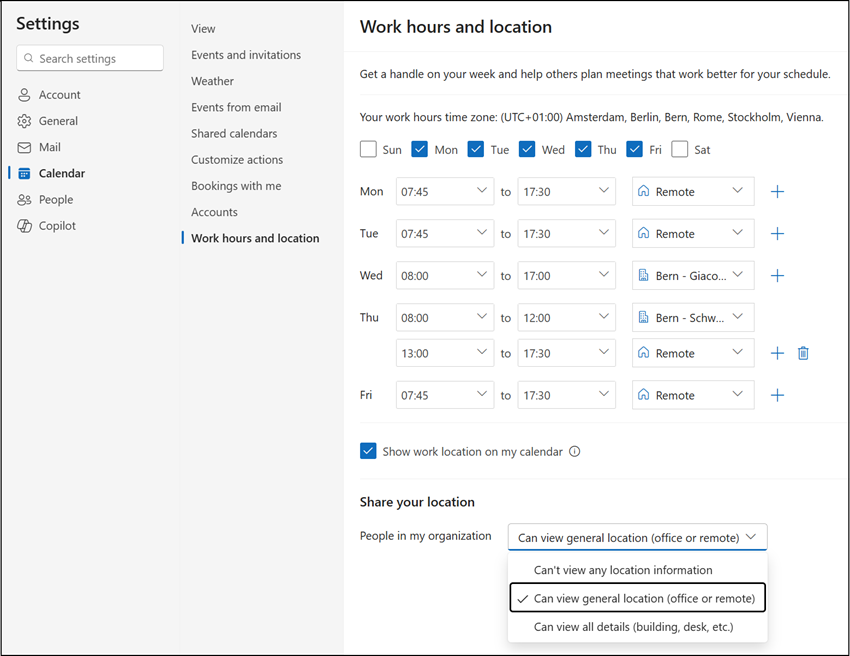
Content
Permission requirements
You need the following Microsoft Graph permission scopes:
- Calendars.ReadWrite > to set work hours and work location.
- MailboxSettings.ReadWrite > to update the “Share your location” setting.
- Place.Read.All > to get building information from Microsoft Places.
Reading work hours and clean-up
You must create or update a workPlanRecurrence to define work hours and location.
But first, I check all existing recurrence items for the account.
Import-Module Microsoft.Graph.Authentication
Connect-MgGraph -scopes "Calendars.ReadWrite", "MailboxSettings.ReadWrite", "Place.Read.All"


$UserID = "<UserPrincipalName or UserObjectID>"
$Url = "https://graph.microsoft.com/beta/users/$UserID/settings/workHoursAndLocations/recurrences"
$WorkRecResults = Invoke-MgGraphRequest -Method GET $Url
$WorkRecResults.value
The results are strange. It seems Outlook never deletes outdated items.
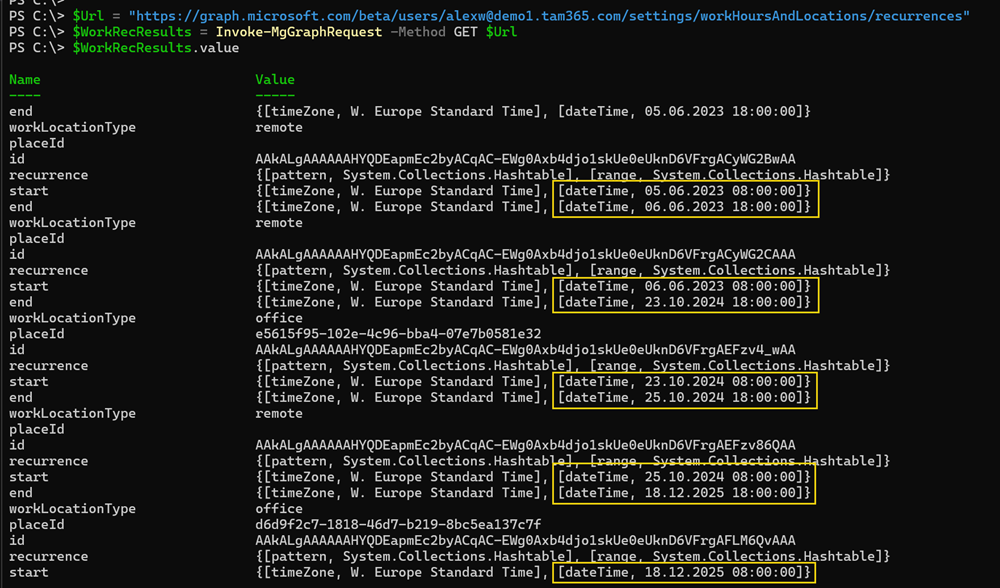
I delete all existing recurrences to start with a clean configuration.
foreach( $Recurrence in $WorkRecResults.value ) {
    $Url = "https://graph.microsoft.com/beta/users/$UserID/settings/workHoursAndLocations/recurrences/$($Recurrence.id)"
    Invoke-MgGraphRequest -Method DELETE -Uri $Url
}
Reset confirmed, all work hours are now empty.
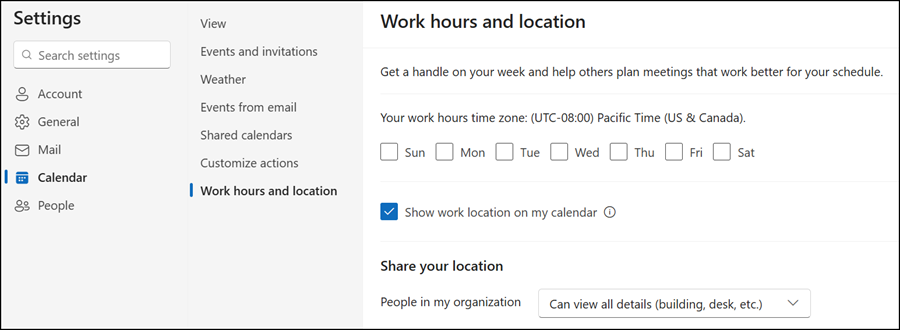
Adding new work hours
I have remote days on Monday, Tuesday, and Friday.
Some important points:
- The system validates whether the defined start and end dates match the selected weekday.
For example, you cannot configure Monday to start on 17 December 2025, because the 17th is a Wednesday; otherwise, the system returns an error.
Start time is on a different day of week than the recurrence details.- You cannot define more than one weekday in a single request. You need separate requests for Monday, Tuesday, and Friday; otherwise, the system returns an error.
Weekly pattern should have exactly one day.For this reason, I prepared three requests.
$MSGraph_WorkHoursRecUrl = "https://graph.microsoft.com/beta/users/$UserID/settings/workHoursAndLocations/recurrences"

# Monday

$Body = @"
{
    "start": {
        "dateTime": "2025-12-15T07:45:00.0000000",
        "timeZone": "W. Europe Standard Time"
    },
    "end": {
        "dateTime": "2025-12-15T17:30:00.0000000",
        "timeZone": "W. Europe Standard Time"
    },
    "workLocationType": "remote",
    "recurrence": {
        "pattern": {
        "type": "weekly",
        "interval": 1,
        "firstDayOfWeek": "monday",
        "daysOfWeek": ["monday"]
        },
        "range": {
        "type": "noEnd",
        "startDate": "2025-12-15",
        "recurrenceTimeZone": "W. Europe Standard Time"
        }
    }
}
"@

Invoke-MgGraphRequest -Method POST -Uri $MSGraph_WorkHoursRecUrl -Body $Body -ContentType "application/json" | Out-Null

# Tuesday

$Body = @"
{
    "start": {
        "dateTime": "2025-12-16T07:45:00.0000000",
        "timeZone": "W. Europe Standard Time"
    },
    "end": {
        "dateTime": "2025-12-16T17:30:00.0000000",
        "timeZone": "W. Europe Standard Time"
    },
    "workLocationType": "remote",
    "recurrence": {
        "pattern": {
        "type": "weekly",
        "interval": 1,
        "firstDayOfWeek": "monday",
        "daysOfWeek": ["tuesday"]
        },
        "range": {
        "type": "noEnd",
        "startDate": "2025-12-15",
        "recurrenceTimeZone": "W. Europe Standard Time"
        }
    }
}
"@

Invoke-MgGraphRequest -Method POST -Uri $MSGraph_WorkHoursRecUrl -Body $Body -ContentType "application/json" | Out-Null


# Friday

$Body = @"
{
    "start": {
        "dateTime": "2025-12-19T07:45:00.0000000",
        "timeZone": "W. Europe Standard Time"
    },
    "end": {
        "dateTime": "2025-12-19T17:30:00.0000000",
        "timeZone": "W. Europe Standard Time"
    },
    "workLocationType": "remote",
    "recurrence": {
        "pattern": {
        "type": "weekly",
        "interval": 1,
        "firstDayOfWeek": "monday",
        "daysOfWeek": ["friday"]
        },
        "range": {
        "type": "noEnd",
        "startDate": "2025-12-15",
        "recurrenceTimeZone": "W. Europe Standard Time"
        }
    }
}
"@

Invoke-MgGraphRequest -Method POST -Uri $MSGraph_WorkHoursRecUrl -Body $Body -ContentType "application/json" | Out-Null
A check confirms it; all three days are defined correctly.
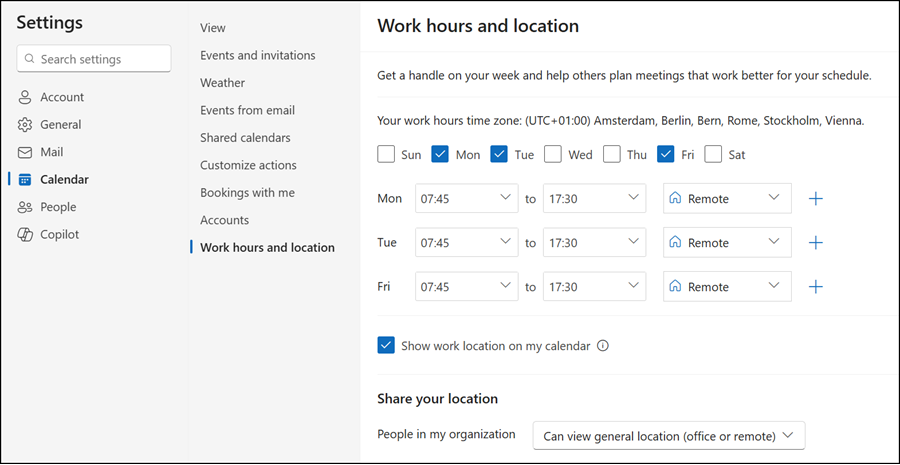
Next, Wednesday is an office day.
You must add the Microsoft Places building ID if you configured custom work locations, as described in August 2024.
Get the buildings via the Microsoft Places API…
$MSGraph_PlacesBuildingUrl = "https://graph.microsoft.com/beta/places/microsoft.graph.building"
$AllMPBuildings = Invoke-MgGraphRequest -Method GET -Uri $MSGraph_PlacesBuildingUrl
$AllMPBuildings = $AllMPBuildings.value | select id,displayName
…and define an office day. You must use “office” as the workLocationType to combine it with placeid.
$MPBuilding_BEGia = $AllMPBuildings | ?{ $_.displayName -eq "Bern - Giacomettistrasse" }

$Body = @"
{
    "start": {
        "dateTime": "2025-12-17T08:00:00.0000000",
        "timeZone": "W. Europe Standard Time"
    },
    "end": {
        "dateTime": "2025-12-17T17:00:00.0000000",
        "timeZone": "W. Europe Standard Time"
    },
    "workLocationType": "office",
    "placeId": "$($MPBuilding_BEGia.id)",
    "recurrence": {
        "pattern": {
        "type": "weekly",
        "interval": 1,
        "firstDayOfWeek": "monday",
        "daysOfWeek": ["wednesday"]
        },
        "range": {
        "type": "noEnd",
        "startDate": "2025-12-15",
        "recurrenceTimeZone": "W. Europe Standard Time"
        }
    }
}
"@

Invoke-MgGraphRequest -Method POST -Uri $MSGraph_WorkHoursRecUrl -Body $Body -ContentType "application/json" | Out-Null
Next, Thursday is a partial office day, with remote work in the afternoon.
You need to combine the samples from Monday and Wednesday using two requests. The first request defines the office part, the second defines the remote part.
# Morning in the office

$MPBuilding_BESchwarztorstrasse = $AllMPBuildings | ?{ $_.displayName -eq "Bern - Schwarztorstrasse" }

$Body = @"
{
    "start": {
        "dateTime": "2025-12-18T08:00:00.0000000",
        "timeZone": "W. Europe Standard Time"
    },
    "end": {
        "dateTime": "2025-12-18T12:00:00.0000000",
        "timeZone": "W. Europe Standard Time"
    },
    "workLocationType": "office",
    "placeId": "$($MPBuilding_BESchwarztorstrasse.id)",
    "recurrence": {
        "pattern": {
        "type": "weekly",
        "interval": 1,
        "firstDayOfWeek": "monday",
        "daysOfWeek": ["thursday"]
        },
        "range": {
        "type": "noEnd",
        "startDate": "2025-12-15",
        "recurrenceTimeZone": "W. Europe Standard Time"
        }
    }
}
"@

Invoke-MgGraphRequest -Method POST -Uri $MSGraph_WorkHoursRecUrl -Body $Body -ContentType "application/json" | Out-Null

# Afternoon in a remote office

$Body = @"
{
    "start": {
        "dateTime": "2025-12-18T13:00:00.0000000",
        "timeZone": "W. Europe Standard Time"
    },
    "end": {
        "dateTime": "2025-12-18T17:30:00.0000000",
        "timeZone": "W. Europe Standard Time"
    },
    "workLocationType": "remote",
    "recurrence": {
        "pattern": {
        "type": "weekly",
        "interval": 1,
        "firstDayOfWeek": "monday",
        "daysOfWeek": ["thursday"]
        },
        "range": {
        "type": "noEnd",
        "startDate": "2025-12-15",
        "recurrenceTimeZone": "W. Europe Standard Time"
        }
    }
}
"@

Invoke-MgGraphRequest -Method POST -Uri $MSGraph_WorkHoursRecUrl -Body $Body -ContentType "application/json" | Out-Null
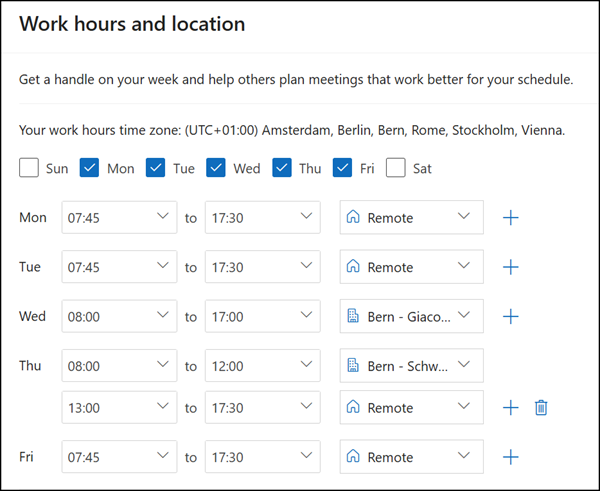
The result is quite good and as expected.
Please note that building information can sometimes be inconsistent in the web interface, as Outlook often relies on cached data (especially if you renamed a building). The data returned via the API is correct.
The final step is to update the sharing settings.

This value is defined in workHoursAndLocationsSetting and supports three values:
- specific > Detailed location information is shared, such as building and desk details. This is the default value.
- approximate > Only the general work location type is shared, such as office or remote.
- none > No location details are shared.
Setting the approximate value.
I could not find a way to modify the “Show work location on my calendar” setting using the new API.
$Body = @"
{
  "maxSharedWorkLocationDetails": "approximate"
}
"@

$MSGraph_WorkLocationsUrl = "https://graph.microsoft.com/beta/users/$UserID/settings/workHoursAndLocations"
Invoke-MgGraphRequest -Method PATCH -Uri $MSGraph_WorkLocationsUrl -Body $Body -ContentType "application/json" | Out-Null
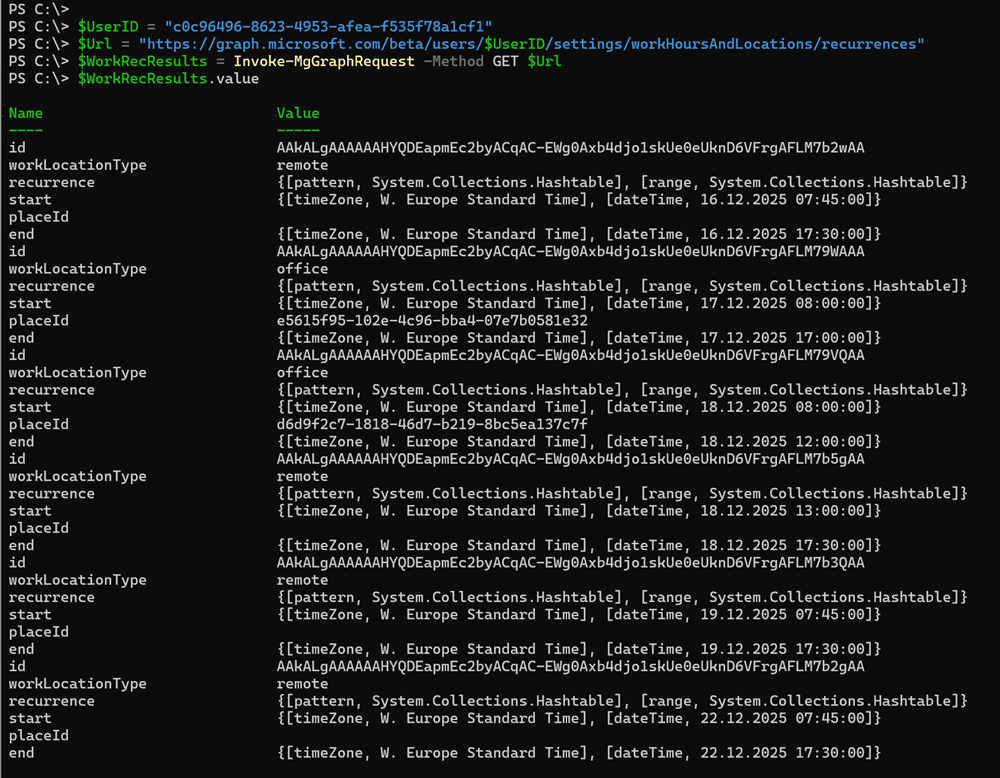
This completes the initial configuration. A validation check returns clean recurrence results.
Note the entry for 22 December. Because I created the sample on Tuesday, 16 December, Outlook sets the following Monday (22 December) as the first Monday occurrence. All items repeat weekly with no end date, with your individual option to define an alternative recurrence plan.
Updating and deleting work hours
I want to update the Thursday entry. The simplest approach is to delete both items and create a new one for Thursday. In my case, I combine deletion and update.
This line should be updated. I extend Thursday to a full office day.

First, I delete the Remote item.
$Url = "https://graph.microsoft.com/beta/users/$UserID/settings/workHoursAndLocations/recurrences"
$WorkRecResults = Invoke-MgGraphRequest -Method GET $Url

$WorkdayAfternoon = $WorkRecResults.value | ?{$_.recurrence.pattern.daysOfWeek -eq "thursday" -and $_.workLocationType -eq "remote" }
$MSGraph_WorkHoursRecUrl = "https://graph.microsoft.com/beta/users/$UserID/settings/workHoursAndLocations/recurrences/$($WorkdayAfternoon.id)"
Invoke-MgGraphRequest -Method DELETE -Uri $Url
Second, I update the existing item. To update an item, use the same JSON body as for creation, but send a PUT request instead of POST, targeting the existing recurrence ID.
$WorkdayMorning = $WorkRecResults.value | ?{$_.recurrence.pattern.daysOfWeek -eq "thursday" -and $_.workLocationType -eq "office" }

$Body = @"
{
    "start": {
        "dateTime": "2025-12-18T08:00:00.0000000",
        "timeZone": "W. Europe Standard Time"
    },
    "end": {
        "dateTime": "2025-12-18T17:00:00.0000000",
        "timeZone": "W. Europe Standard Time"
    },
    "workLocationType": "office",
    "placeId": "$($MPBuilding_BESchwarztorstrasse.id)",
    "recurrence": {
        "pattern": {
        "type": "weekly",
        "interval": 1,
        "firstDayOfWeek": "monday",
        "daysOfWeek": ["thursday"]
        },
        "range": {
        "type": "noEnd",
        "startDate": "2025-12-15",
        "recurrenceTimeZone": "W. Europe Standard Time"
        }
    }
}
"@


$MSGraph_WorkHoursRecUrl = "https://graph.microsoft.com/beta/users/$UserID/settings/workHoursAndLocations/recurrences/$($WorkdayMorning.id)"
Invoke-MgGraphRequest -Method PUT -Uri $MSGraph_WorkHoursRecUrl -Body $Body -ContentType "application/json" | Out-Null
That’s it, a complete work hours plan created and updated using the new APIs.

