
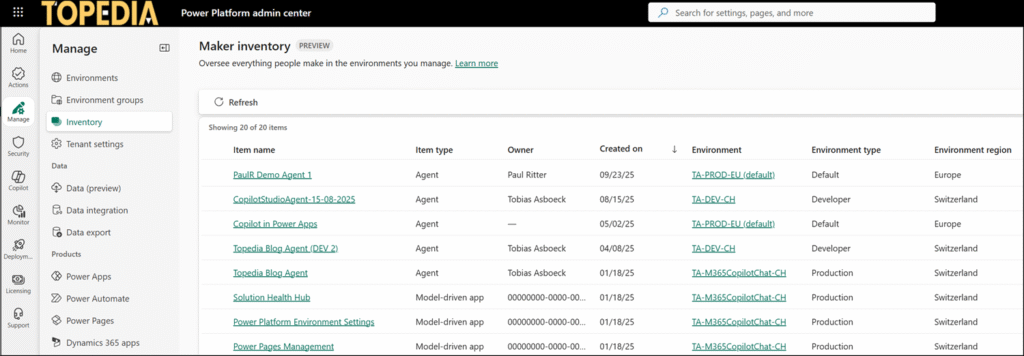
The Power Platform Admin Center includes a new Power Platform Inventory, available for users with the Power Platform Administrator role.
The Inventory provides administrators a consolidated view of Copilot agents created in Copilot Studio and apps developed in Power Apps (such as canvas apps, model-driven apps, code apps, and apps created in the Microsoft 365 App Builder). More resource types, such as Power Automate flows, are planned for future updates.
You can open the Inventory page directly at Power Platform Admin Center > Manage > Inventory.
Changes to resources (create, update, or delete) are reflected with a latency of up to 15 minutes.
Power Platform Inventory API
The more interesting part for me was the programmatic access. You can also get the web information via the Power Platform Inventory API (Preview). Power Platform calls the API to load the data.
I am using interactive, delegated authentication, as the API currently does not seem to support unattended authentication. The documentation still has a few gaps, so working with the API requires trial and error.
When you query the API, Power Platform forwards your request to the Azure Management Service, which currently requires an On-Behalf-Of flow for unattended access. It’s working with an interactive authentication.

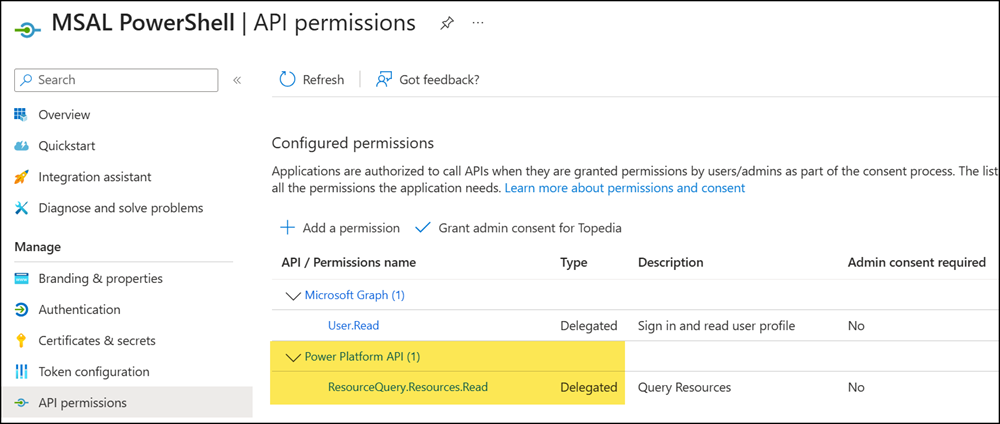
- I am using the MSAL PowerShell module to get an authentication token. I created an Azure App registration for MSAL and added the Power Platform permission ResourceQuery.Resources.Read.
You have full access as a Power Platform Administrator. MSAL needs at least one Power Platform permission for the authentication scope.
- Next, get the authentication token from the MSAL application.
Import-Module MSAL.PS
$MSALPSAppId = "<AppId>"
$AuthScope = "https://api.powerplatform.com/.default"

$Token = Get-MsalToken -ClientId $MSALPSAppId -Scopes $AuthScope -Interactive
$AuthHeader = @{ Authorization = "Bearer $($Token.AccessToken)" }- The Power Platform Inventory API requires a KQL query in the request body. You find some KQL examples in the documentation. ChatGPT, Gemini & others can also help construct your KQL query.
A first example retrieves up to 200 Copilot Studio agents from the Inventory.
#Get up to 200 Copilot Stuio agents

$Body = @"
{
  "TableName": "PowerPlatformResources",
  "Clauses": [
    {
      "`$type": "where",
      "FieldName": "type",
      "Operator": "==",
      "Values": ["'microsoft.copilotstudio/agents'"]
    },
    {
      "`$type": "project",
      "FieldList": [
        "name",
        "location",
        "type",
        "properties.displayName",
        "properties.createdAt",
        "properties.createdBy",
        "properties.environmentId",
        "properties.ownerId",
        "properties.lastPublishedAt",
        "properties.createdIn",
        "properties.schemaName"
      ]
    },
    {
      "`$type": "take",
      "TakeCount": 200
    }
  ]
}
"@

$Url = "https://api.powerplatform.com/resourcequery/resources/query?api-version=2024-10-01"
$Result = Invoke-RestMethod -Uri $Url -Method POST -Headers $AuthHeader -Body $Body -ContentType "application/json"
$Result.data
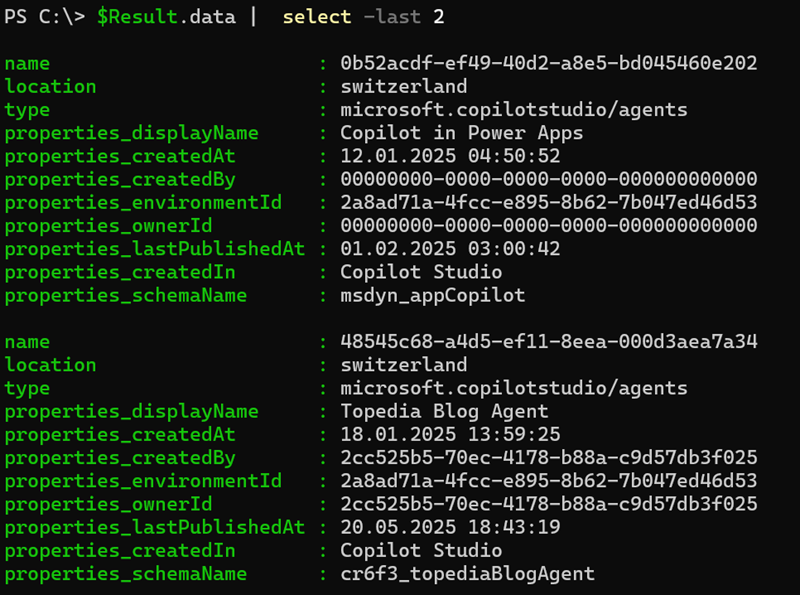
First results. The name is the agent ID, which you require for other Power Platform APIs.
The original KQL query from the JSON body.
PowerPlatformResources
| where type == "microsoft.copilotstudio/agents"
| project
    name,
    location,
    type,
    properties.displayName,
    properties.createdAt,
    properties.createdBy,
    properties.environmentId,
    properties.ownerId,
    properties.lastPublishedAt,
    properties.createdIn,
    properties.schemaName
| take 200
- Once this works, you can also call the default API query when loading the Inventory page in your browser.

This default query is also included as a sample in the documentation.
# Calling the default API query from the Power Platform Inventory

$Body = @"
{
  "Options": {
    "Top": 1000,
    "Skip": 0,
    "SkipToken": ""
  },
  "TableName": "PowerPlatformResources",
  "Clauses": [
    {
      "`$type": "extend",
      "FieldName": "joinKey",
      "Expression": "tolower(tostring(properties.environmentId))"
    },
    {
      "`$type": "join",
      "JoinKind": "leftouter",
      "RightTable": {
        "TableName": "PowerPlatformResources",
        "Clauses": [
          {
            "`$type": "where",
            "FieldName": "type",
            "Operator": "==",
            "Values": ["'microsoft.powerplatform/environments'"]
          },
            {
            "`$type": "project",
            "FieldList": [
              "joinKey = tolower(name)",
              "environmentName = properties.displayName",
              "environmentRegion = location",
              "environmentType = properties.environmentType",
              "isManagedEnvironment = properties.isManaged"
            ]
          }
        ]
      },
      "LeftColumnName": "joinKey",
      "RightColumnName": "joinKey"
    },
    {
      "`$type": "where",
      "FieldName": "type",
      "Operator": "in~",
      "Values": [
        "'microsoft.powerapps/canvasapps'",
        "'microsoft.powerapps/modeldrivenapps'",
        "'microsoft.powerautomate/cloudflows'",
        "'microsoft.copilotstudio/agents'",
        "'microsoft.powerautomate/agentflows'",
        "'microsoft.powerapps/codeapps'"
      ]
    },
    {
      "`$type": "orderby",
      "FieldNamesAscDesc": {
        "tostring(properties.createdAt)": "desc"
      }
    }
  ]
}
"@

$Result = Invoke-RestMethod -Uri $Url -Method POST -Headers $AuthHeader -Body $Body -ContentType "application/json"
$Result.data
PAC CLI now supports it: https://learn.microsoft.com/en-us/power-platform/developer/cli/reference/admin#pac-admin-query
Plus, you can use AI skill to call PAC CLI from AI agent
Thank you Andrew for this addition. Good to know. 👏