
Microsoft Purview now offers data retention policies for Copilot Memory to control how memory is handled when users edit or delete it. Copilot Memory covers the content that makes Copilot feel personal and relevant to each user, such as saved memories, details Copilot picks up from chat history, and custom instructions.
Until now, retention policies and labels could not control this kind of content. With this update, earlier versions of a memory item can be kept for a set period whenever a user updates or deletes it.
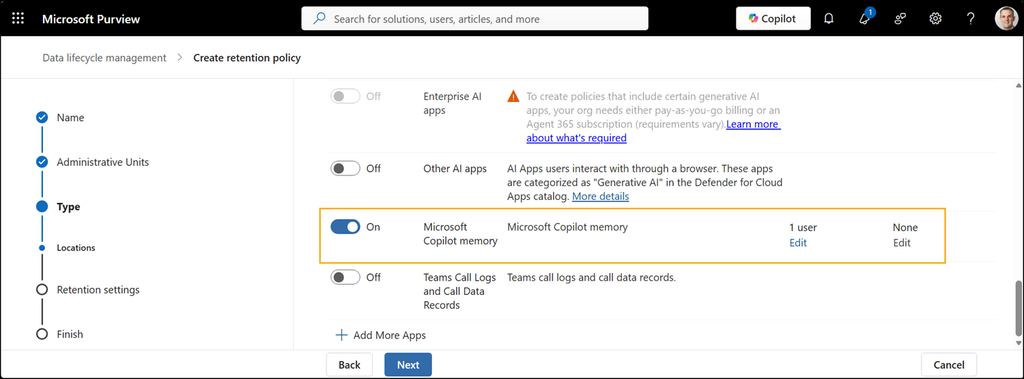
For users, day-to-day use of Copilot stays the same. Saved memories remain available until a user deletes them, and users stay in control of what Copilot remembers. Turning off enhanced personalization or saved memories stops Copilot from using that memory, but it does not automatically delete anything saved earlier.
The update gives compliance teams a way to preserve previous versions of edited or deleted Copilot memory items, rather than having them disappear completely. These preserved versions are stored in a hidden folder within the user’s Exchange Online mailbox and are protected by the same security that applies to the rest of the mailbox. Users do not see this folder and do not need to take any action.
Details about the location are available in Collecting Microsoft 365 Copilot Data with Microsoft Purview eDiscovery. That post is from May 2026, before Copilot memory retention was available in Microsoft Purview.
This update matters because it can help compliance and legal teams meet record-keeping expectations and review how Copilot memory content has changed over time, such as during an internal review or a legal request. Authorized teams can start an eDiscovery search for Copilot personalization and memory items (stored in the Exchange mailbox) when needed.
