
Microsoft 365 Copilot Chat now supports working with mailboxes users already have access to, such as shared and delegated mailboxes. This update relates to Copilot in shared and delegated mailboxes (introduced in June 2026) and sending emails directly in Copilot Chat (introduced in March 2026).
When using Copilot Chat, Copilot Premium users can now select a mailbox they have permission to access and interact with Copilot in the context of that mailbox. This requires Copilot Chat Web or the Copilot desktop app. Changing accounts is not supported in Copilot Chat in Teams.
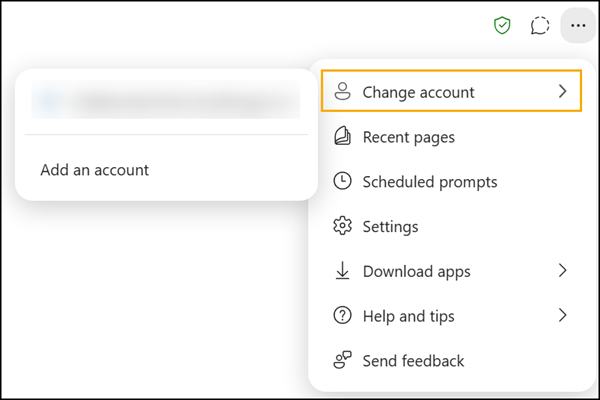
This update can be useful for:
✅ Summarizing emails in a shared mailbox
✅ Finding conversations on a specific topic
✅ Drafting responses more efficiently
✅ Staying up to date on team-managed inboxes
Copilot can also prepare emails in the chat, showing a draft.
Currently, Copilot Chat cannot send the email from the shared or delegated mailbox because it cannot change the From address. Copilot will indicate the AI cannot change the sender. The draft is saved in the user’s Outlook Draft folder. Users can open the draft to change the sender address manually.
Copilot Chat can help draft content, summarize messages, and retrieve information from a shared or delegated mailbox. However, the ability to select and enforce a specific From address (for example, a shared mailbox) depends on the underlying mail client and the permissions assigned to the user.
In practical terms:
- Copilot respects all existing mailbox permissions.
- Copilot does not elevate privileges or bypass Exchange Online controls.
- Sending as a shared mailbox still requires the appropriate Send As or Send on Behalf permission.
- The sender address must be selected by the user in Outlook when composing or sending the message.
- Copilot-generated drafts are typically created in the user’s own mailbox context unless the application explicitly supports creating drafts in a shared mailbox context.
This design helps ensure security, compliance, accountability, and transparency when communicating on behalf of teams, departments, or shared business functions.
Copilot
🔐 Security and permissions remain unchanged
Copilot does not grant additional access rights. It only works within the permissions administrators have already assigned to users through Exchange Online. Copilot Chat can assist users with the content available if they can access a shared or delegated mailbox.
💡 Typical use cases
- Team mailboxes (such as support or service desks)
- Executive assistants working with delegated mailboxes
- Functional mailboxes managed by multiple users
- Shared project or department inboxes
This capability can reduce the time required to review, summarize, and respond to emails while maintaining existing security and governance controls.
