
Microsoft is retiring the heavily pushed Microsoft 365 companion apps Calendar, People, and Files in December 2026. These taskbar-integrated apps gave quick access to calendar information, people, and files.
Timeline
- Since 18 September 2026: Microsoft no longer installs the companion apps automatically and no longer provides updates or fixes, including security fixes.
- Starting 16 December 2026: The companion apps will stop working and will no longer be supported.
How does this affect your organization?
At the end of October 2025, Microsoft started automatically installing the Microsoft 365 companion apps (People, Files, and Calendar) on Windows 11 devices that already had Microsoft 365 desktop client apps. Their lifespan was short. It seems even a default setup that preinstalls the apps did not drive real-world adoption.
Microsoft no longer installs the companion apps automatically through Microsoft 365 Apps updates. Existing installations keep working until 16 December 2026, but they no longer receive updates or fixes, including security fixes. After that date, the apps stop working. Admins should read the retirement guidance at Microsoft 365 companion apps retirement.
Also worth noting:
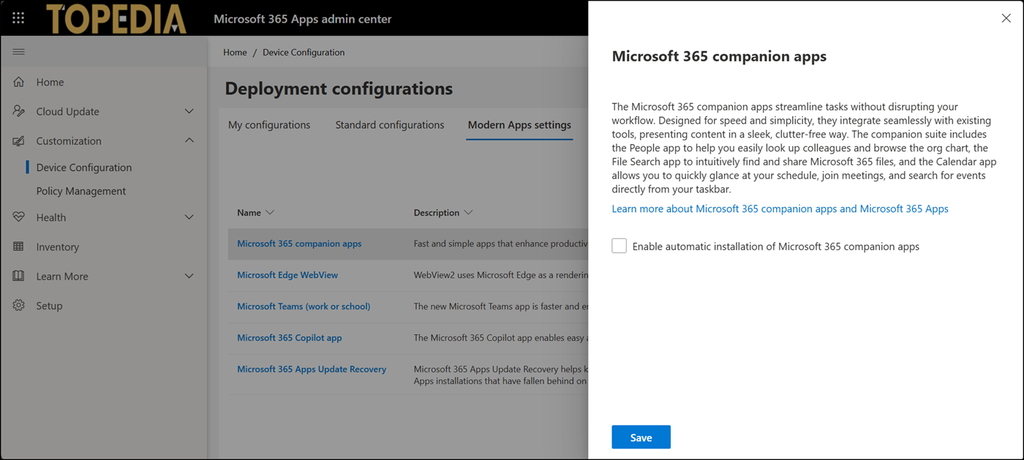
Microsoft’s change won’t clear the Enable automatic installation of Microsoft 365 companion apps setting in the Microsoft 365 Apps admin center. We recommend that you clear this setting to avoid confusion when you later uninstall the companion apps.
Open the Microsoft 365 Apps admin center > Customization > Device Configuration > Modern Apps settings, then the Microsoft 365 companion apps, and disable the automatic installation.
Without these companion apps, users can still find calendar information, people, and files with existing Microsoft 365 and Windows experiences, the same as before November 2025:
- Outlook and Teams for calendar information and people
- Windows Search Box and File Explorer for files on the device
- SharePoint and OneDrive for files in Microsoft 365
Compared to a few months ago, Microsoft now recommends uninstalling the apps from managed devices. Admins should no longer deploy them. Removing the companion apps does not delete or change any existing capabilities or Microsoft 365 data.
