
Microsoft added a new setting to the Microsoft 365 admin center that controls who can upload advanced agent and plugin packages to Microsoft 365 Copilot. AI Administrators can allow uploads for all users, restrict them to specific users or Microsoft Entra ID groups, or block them entirely.
Timeline
- Since 25 September 2026: The new admin setting is available in the Microsoft 365 admin center.
- Starting 25 October 2026: Advanced package uploads remain allowed for all users unless administrators select a different option.
How does this affect your organization?
Microsoft added a new setting in the Microsoft 365 admin center to control who can upload advanced agents and plugins to Microsoft 365 Copilot and Cowork, including uploads from the Microsoft 365 Agents Toolkit.
To configure the new setting, open the Microsoft 365 admin center > Copilot > Settings > All settings > Advanced package uploads and select the preferred option.
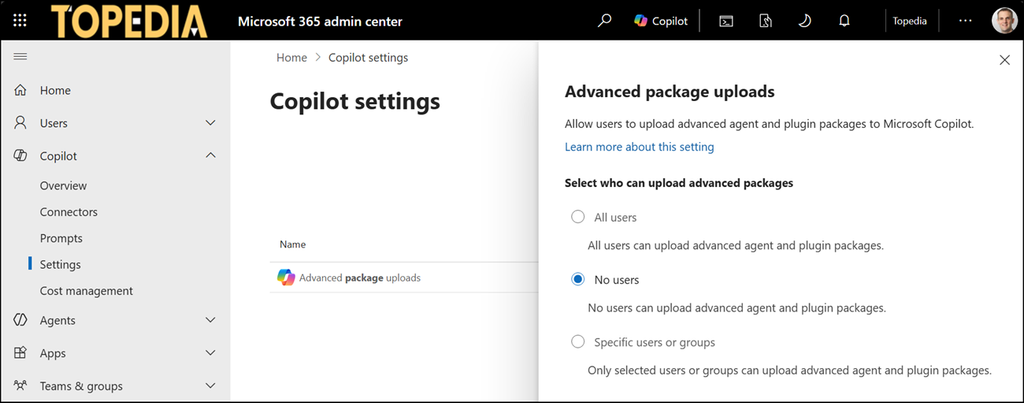
This setting has no impact on basic package uploads. Basic packages include Declarative Agents with instructions only (no actions).
An advanced package uses either a Declarative Agent with actions or an MCP server. All other packages are considered basic. The setting applies only to packages uploaded by members of the organization and does not affect agents built by Microsoft or third parties.
AI administrators have until 25 October 2026 to choose their preferred configuration. If no configuration is selected, advanced package uploads remain allowed for all users, which matches the current behavior.
