
Since Friday, 18 September, Microsoft added, removed, and then re-added the permission microsoft.directory/oAuth2PermissionGrants/allProperties/allTasks to the AI Administrator role in Entra ID. It’s a privileged permission. Before 18 September, the role had only the permission microsoft.directory/oAuth2PermissionGrants/standard/read.

A review in the documentation shows 7 other administrator roles have this permission:
- Application Administrator
- Cloud Application Administrator
- Global Administrator
- Partner Tier1 Support
- Partner Tier2 Support
- Privileged Role Administrator
- User Administrator
The permission gives admins control over delegated permission grants (OAuth2 permission grants). A delegated permission grant stores which permissions an application or agent may use on behalf of a signed-in user, either for one user or for all users in the organization.
Note:
- The update does not cover application permission grants.
- Users with the AI Administrator role can grant consent for delegated permissions. They cannot add, remove, or revoke permissions in the application.
An example of such a delegated permission grant:
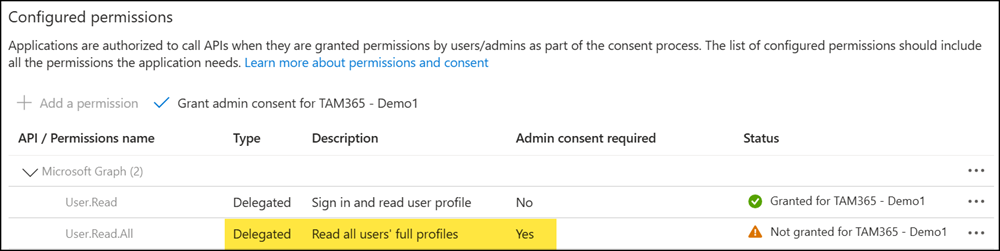
Users with the AI Administrator role can now consent to delegated permissions themselves, which can reduce the need to involve other administrator roles.
