
Microsoft is rolling out the new OneDrive Pay-as-you-go (PAYG) billing service for organizations (currently in preview). This PAYG service should be an alternative to the expensive OneDrive storage add-ons, introduced in June 2026. The billing service is not currently available to education, GCC, or Microsoft 365 customers operated by 21Vianet in China.
***********
Updated 23 September 2026:
General availability is scheduled for November/December 2026.
***********
Microsoft 365 OneDrive Storage adds OneDrive capacity beyond what is included with a user’s license. After connecting the service to a billing policy, SharePoint administrators can freely increase a user’s storage limit above the licensed amount, up to 25 TB per OneDrive account. Billing applies only to storage usage above the licensed storage limit (see the license entitlements below). As expected, costs are the same as for SharePoint PAYG Storage.
Microsoft 365 OneDrive Storage
The number of gigabytes (GB) of data that exceeds each account’s licensed storage entitlement.
$0.20/GB/month (shows on invoice as $0.00667/GB/day)

The rollout timing is not a coincidence, as Microsoft currently informs legacy customers with OneDrive accounts beyond 5 TB about a storage change in the next few months.
Important:
Administrators cannot assign the OneDrive PAYG billing policy to individual user accounts. This policy applies to all OneDrive accounts in the organization. As Microsoft recently described it, a OneDrive account must fulfill the “license entitlements”. The OneDrive service description lists the latest entitlements.
Microsoft forgot the Office 365 Enterprise licenses in the table. These entitlements are available in the Enterprise licensing PDF, at least in the latest edition from August 2026.
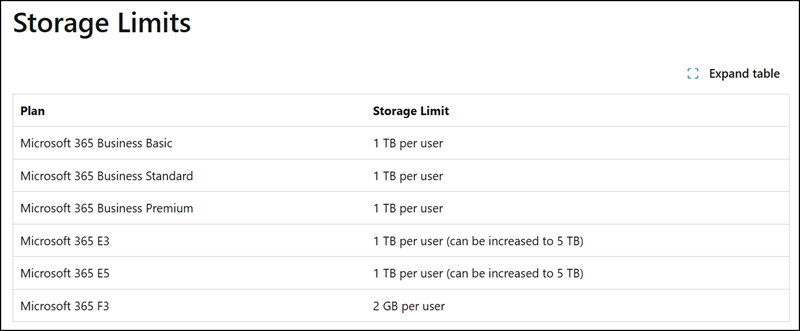
If OneDrive storage is above the limit, OneDrive PAYG billing applies once a policy is configured.
I have configured such a policy for testing purposes. The results are pending.

Run the OneDrive storage reporting script
Run the OneDrive storage reporting script before you enable this billing policy (prepared by Microsoft). The script also provides an overview of which accounts exceed their licensed storage limits. All accounts with Over = YES.
# Run the OneDrive storage reporting script
.\Get-OneDriveStorageReport.ps1 -ExportPath "<YourExportPath>\OneDriveStorageReport.csv"
I am currently testing if unlicensed users with used OneDrive storage are also billed. I expect this to be the case.
The script is based on the OneDrive usage report in the Microsoft 365 admin center (with the default FastScan scan method). The OneDrive usage report is currently delayed in my tenant, or there is a general issue, as my OneDrive accounts haven’t updated in more than 72 hours. Microsoft may not have activated the PAYG billing process yet.
************
Updated 14 September 2026:
I suspected this already; Microsoft has now confirmed an issue with OneDrive usage report updates (see MO1471241).
This Usage data refresh issue affects the following reports:
- OneDrive Usage reports
- SharePoint Usage reports
- Group Activity reports
These reports may not have refreshed since September 8, 2026.
…
Our upstream data pipeline is encountering refresh errors and failures when retrieving up-to-date data for the listed reports, which is resulting in this impact.
************
I also prepared a PAYG precalculation and a table for ordering it as a OneDrive Storage add-on.
OneDrive PAYG Storage – Cost by Storage Limit
| Raised to | 1 TB storage limit | Monthly $ | 5 TB storage limit | Monthly $ |
|---|---|---|---|---|
| 2 TB | +1 | $204.80 | — | — |
| 3 TB | +2 | $409.60 | — | — |
| 4 TB | +3 | $614.40 | — | — |
| 5 TB | +4 | $819.20 | +0 | $0.00 |
| 10 TB | +9 | $1,843.20 | +5 | $1,024.00 |
| 15 TB | +14 | $2,867.20 | +10 | $2,048.00 |
| 20 TB | +19 | $3,891.20 | +15 | $3,072.00 |
| 25 TB | +24 | $4,915.20 | +20 | $4,096.00 |
The base pricing for add-ons is $0.24/GB/month, notably higher than the $0.20/GB/month PAYG meter.
The OneDrive Storage add-on is consistently priced at $0.24/GB/month across all pack sizes, from 100 GB to 6 TB. This indicates Microsoft prices the add-on using the decimal convention (1 TB = 1,000 GB), rather than the binary convention (1 TB = 1,024 GB) used for OneDrive quotas in the admin center and PowerShell.
OneDrive Extra Storage – Add-on Pricing – Product ID CFQ7TTBZTMB1
| Add-on size | Monthly $ | Annual $ (billed yearly) | Annual $ (billed monthly) |
|---|---|---|---|
| 100 GB | $24.00 | $240.00 | $252.00 |
| 500 GB | $120.00 | $1,200.00 | $1,260.00 |
| 1 TB | $240.00 | $2,400.00 | $2,520.00 |
| 2 TB | $480.00 | $4,800.00 | $5,040.00 |
| 3 TB | $720.00 | $7,200.00 | $7,560.00 |
| 4 TB | $960.00 | $9,600.00 | $10,080.00 |
| 5 TB | $1,200.00 | $12,000.00 | $12,600.00 |
| 6 TB | $1,440.00 | $14,400.00 | $15,120.00 |
Alternatively, if the $0.24/GB/month pricing looks familiar. Microsoft reused the monthly rate from the Office 365 Extra File Storage product, which increases SharePoint Online tenant storage, to calculate pricing for the OneDrive storage add-ons.

