
Microsoft has added a new tenant setting for Microsoft 365 customers to force in-country data storage for tenants in supported countries. The setting lets administrators choose whether Microsoft 365 customer data is stored in-country or can be stored regionally within the EU Data Boundary.
- The setting is currently available to tenants in France, Germany, Norway, Sweden, or Switzerland.
- The setting affects Exchange Online, SharePoint, OneDrive, Microsoft Teams, Microsoft Copilot, and Microsoft Copilot Chat.
- Customer data remains within the EU Data Boundary regardless of the setting. Privacy, security, compliance, and encryption commitments are unchanged.
Timeline
- 14 September 2026 (for existing tenants): The new setting becomes visible and actionable in the Microsoft 365 admin center.
- From 14 September 2026 (for new tenants): The setting is off by default for eligible tenants created after this date.
- 14 December 2026: The setting selection takes effect for existing tenants.
- The setting can be changed at any time, both during the 90-day window and afterward. Enabling the setting after this window to restore in-country storage may take approximately 6 months to complete. A detail especially relevant for newly created tenants, as the setting is now off by default.
How does this affect your organization?
The setting is off by default for eligible tenants, meaning Microsoft may store customer data regionally within the EU Data Boundary rather than only in-country. Enabling the setting keeps customer data stored in-country.
No data location changes take place before 14 December 2026.
If the setting is still disabled from 14 December 2026 onward, customer data may then start being stored regionally within the EU Data Boundary rather than in-country.
This follows a similar pattern to what Microsoft did with Copilot flex routing in April 2026.
First, Microsoft promotes customer data is stored in-region, or moves data to the country, sometimes at additional cost to customers. Then, after a few years, once data centers become overloaded with Copilot and other workloads, Microsoft wants to store customer data again in EU Data Boundary locations, with the default setting configured to benefit Microsoft’s approach.
Admins with tenants in France, Germany, Norway, Sweden, or Switzerland now find the new setting in the Microsoft 365 admin center > Settings > Org settings > Data Location at the bottom. The setting lets administrators choose in-country storage over regional EU Data Boundary storage for organizational data. Administrators must have the Global Administrator role assigned to update the setting.
Turn this off to allow Microsoft to store this data at rest regionally within the EU Data Boundary. Turn it on at any time to restore in-country storage. Storing data regionally within the EU Data Boundary helps Microsoft maintain a high-performing Microsoft 365 service across the European Union and EFTA countries.
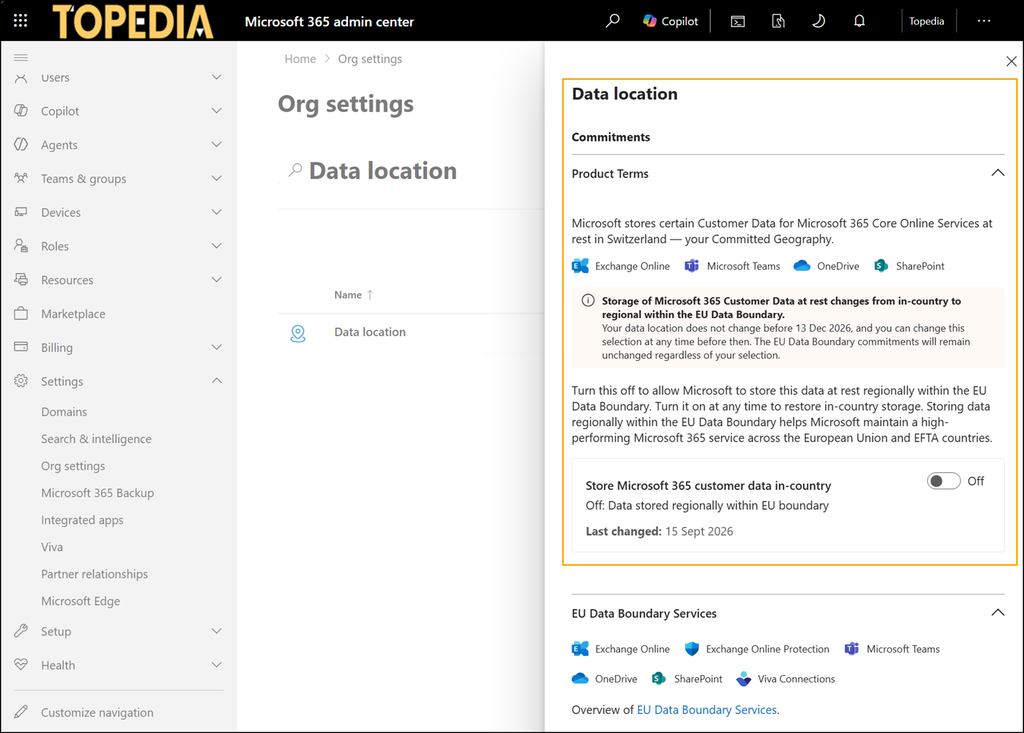
Administrators should review the setting in the Microsoft 365 admin center before 14 December 2026 and decide whether to enable it.
