
Microsoft has updated the Microsoft 365 Copilot and Copilot Chat usage reporting experience across the Microsoft 365 admin center and Microsoft Graph API. The update shortens the reporting refresh interval, changes the default reporting window, separates agent metrics into their own report, and expands the usage data exposed through the Graph API. Previously, the Graph API metrics were never updated since Microsoft released them in September 2024.
Content
Timeline
The rollout should be completed.
How does this affect your organization?
In the past, I criticized Microsoft for the Microsoft 365 Copilot usage reports in the Microsoft 365 admin center including more metrics than the usage reports provided via Microsoft Graph. Microsoft published the API endpoints once in September 2024 and never updated the metrics.
Microsoft has changed this with the current update. Administrators must update their reporting scripts to use the updated metrics. Otherwise, the scripts will still run, but continuously use the previous metrics.
The current update affects…
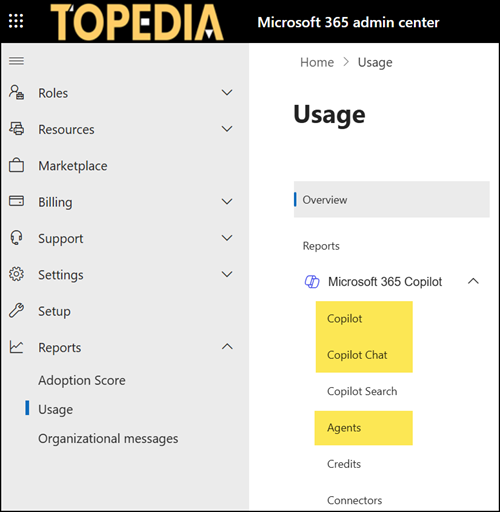
- The Microsoft 365 admin center for the Microsoft 365 Copilot usage report (for Copilot Premium users), the Microsoft 365 Copilot Chat usage report (for Copilot Premium and Basic users), and the Microsoft 365 Copilot Agents usage report.
- The Microsoft Graph API endpoints for copilotReportRoot.
- The Copilot Dashboard in Viva Insights.
What has been changed?
- Report data now becomes available faster. Reports refresh within 48 hours of usage data collection, down from the previous 72-hour window.
- The default reporting window for the Microsoft 365 Copilot usage report changes from 30 to 28 days, aligning it with the default timeframe used in the Copilot Dashboard in Viva Insights.
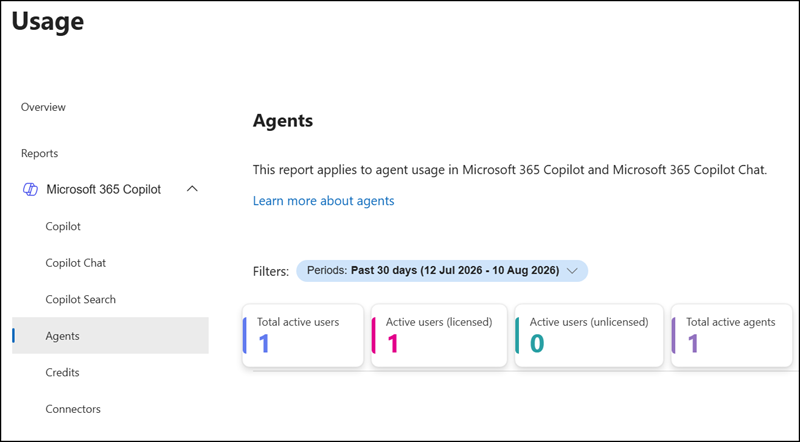
- Agent metrics move out of the Microsoft 365 Copilot usage report and into the dedicated Microsoft 365 Copilot Agents usage report. Administrators who track agent adoption from the main Copilot usage report need to switch to the Agents report to continue seeing that data.
- Microsoft Graph API Copilot usage endpoints are updated to match the metrics available in the Microsoft 365 admin center report.
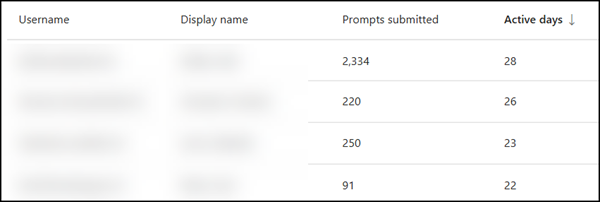
Two metrics are newly available through the API:- Prompts submitted for all apps: the number of prompts submitted by an individual user.
- Active Usage Days for all apps: the number of days an individual user was active.
Metrics for the Copilot Chat (unlicensed) usage report are not yet available through the Graph API. Microsoft plans to add them in a future release.
Updates for the Microsoft Graph API Copilot usage endpoints
Microsoft has aligned the Copilot usage endpoints getMicrosoft365CopilotUserCountSummary, getMicrosoft365CopilotUserCountTrend, and getMicrosoft365CopilotUsageUserDetail with the metrics from the Microsoft 365 admin center. The alignment now comes with previous v1 and new v2 metrics.
- v1 metrics
Returns the previous information. Without an update, your scripts should still run without impact but return v1 metrics, as this is the default.
# Get Microsoft 365 Copilot Usage User Detail (v1), paginated
Connect-MgGraph -Scopes Reports.Read.All

$Url = "https://graph.microsoft.com/beta/copilot/reports/getMicrosoft365CopilotUsageUserDetail(period='D30', version='v1')"
$CopilotUsageUserDetailResults_v1 = @()
do {
    $Response = Invoke-GraphRequest -Method GET -Uri $Url -ContentType "application/json"
    $CopilotUsageUserDetailResults_v1 += $Response.Value
    $Url = $Response.'@odata.nextLink'
} while ($Url)
$CopilotUsageUserDetailResults_v1- v2 metrics
According to the documentation, v2 includes all information from v1 plus the metrics missing from the Microsoft 365 admin center. Administrators must add the v2 parameter to their request to receive the updated metrics. Also, v2 metrics use a different time period (7, 28, 90, and 180 days).
# Get Microsoft 365 Copilot Usage User Detail (v2), paginated
Connect-MgGraph -Scopes Reports.Read.All

$Url = "https://graph.microsoft.com/beta/copilot/reports/getMicrosoft365CopilotUsageUserDetail(period='D28', version='v2')"
$CopilotUsageUserDetailResults_v2 = @()
do {
    $Response = Invoke-GraphRequest -Method GET -Uri $Url -ContentType "application/json"
    $CopilotUsageUserDetailResults_v2 += $Response.Value
    $Url = $Response.'@odata.nextLink'
} while ($Url)
$CopilotUsageUserDetailResults_v2