
Microsoft informs that in selected tenants, Microsoft Defender Unified RBAC (URBAC) is becoming the single access model for all Defender and Sentinel portal experiences in the Defender portal. Tenants still using legacy RBAC will be automatically enabled for Unified RBAC for the in-scope workloads, replacing legacy RBAC as the default authorization source for those experiences.
This change applies to Microsoft Defender and Microsoft Sentinel for selected tenants. Administrators should check for MC1457836, as this message was published only to affected tenants. In my case, I find the message in several tenants where Unified RBAC is not enabled, but not in tenants where Unified RBAC is already enabled.
Timeline
Unified RBAC will be enabled between late September and December 2026, with an in-portal notification banner appearing in the Microsoft Defender portal 30 days prior.
How does this affect your organization?
Until now, Microsoft has automatically enabled Microsoft Defender Unified RBAC in newly created tenants for Defender for Endpoint and Defender for Identity workloads, and since July 2026, also for Defender for Office 365 workloads.
Existing tenants were not modified and still use legacy RBAC if not manually updated.
Legacy RBAC in Microsoft Defender
A set of separate permission systems, one per Defender workload (Endpoint, Office 365, Identity, Sentinel), each configured and managed independently in its own part of the portal. Defender for Endpoint ties roles to device groups, Defender for Office 365 uses Email & collaboration roles, Defender for Identity has its own role groups, and Sentinel relies on Azure RBAC. A user needing access to multiple products needs a separate role assignment in each system, and no single view or shared role model covers permissions across workloads.
Unified RBAC in Microsoft Defender
Replaces these with a single role model and one management surface, the Permissions and roles page in the Defender portal. One role definition can span multiple workloads (Endpoint, Office 365, Identity, Cloud, Cloud Apps, Exposure Management, and Sentinel), with data source and scope selected per role rather than needing entirely separate role systems. It adds scoping mechanisms not available in the legacy models, such as device groups and cloud scopes, and aligns permissions to Microsoft Entra global roles automatically through its mapping logic rather than requiring parallel manual assignment.
The current activation follows a two-stage process, with an optional opt-out available afterward.
- In-portal notification banner in the Microsoft Defender portal
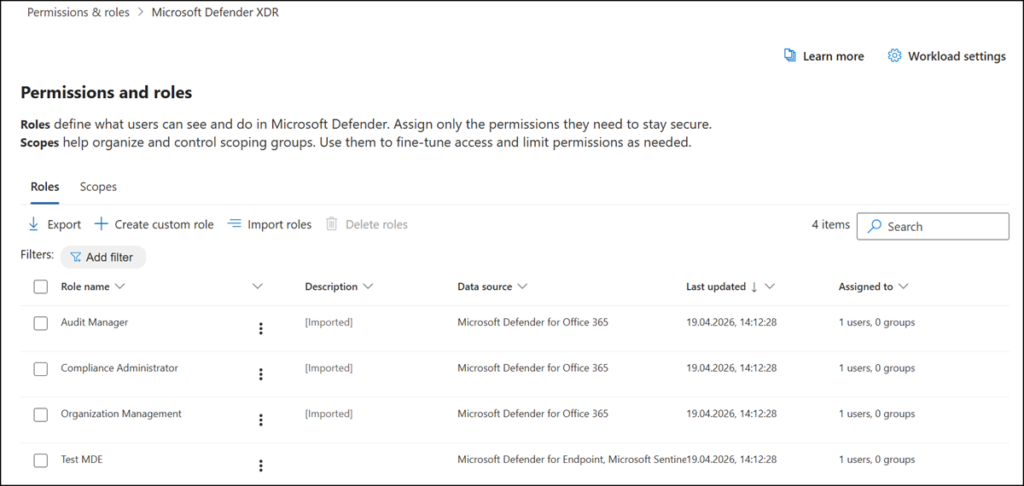
An in-portal notification banner appears on the Permissions and roles page in the Microsoft Defender portal, informing administrators that the specified workload(s) will transition to Unified RBAC.
At this point, Microsoft automatically imports existing legacy RBAC roles into Unified RBAC. Because Unified RBAC is not yet active for the affected workload at this stage, the import itself has no operational impact. Administrators should validate that each user has the expected role and scope, and adjust assignments as needed. Role assignments can be adjusted directly, even before Unified RBAC is activated for the workload.
Navigate to the Defender admin portal > System > Permissions > Microsoft Defender XDR > Roles to find the notification banner.
- About 30 days after the portal notification date
Unified RBAC activates automatically for the in-scope workload(s). A confirmation banner appears on the same Permissions and roles page. From that point, authorization for Defender and Sentinel portal experiences defaults to Unified RBAC roles, and legacy RBAC assignments are no longer required to operate those portal experiences. - Optional opt-out: after activation, administrators can use the workload settings control in Unified RBAC to revert to the legacy RBAC system if needed.
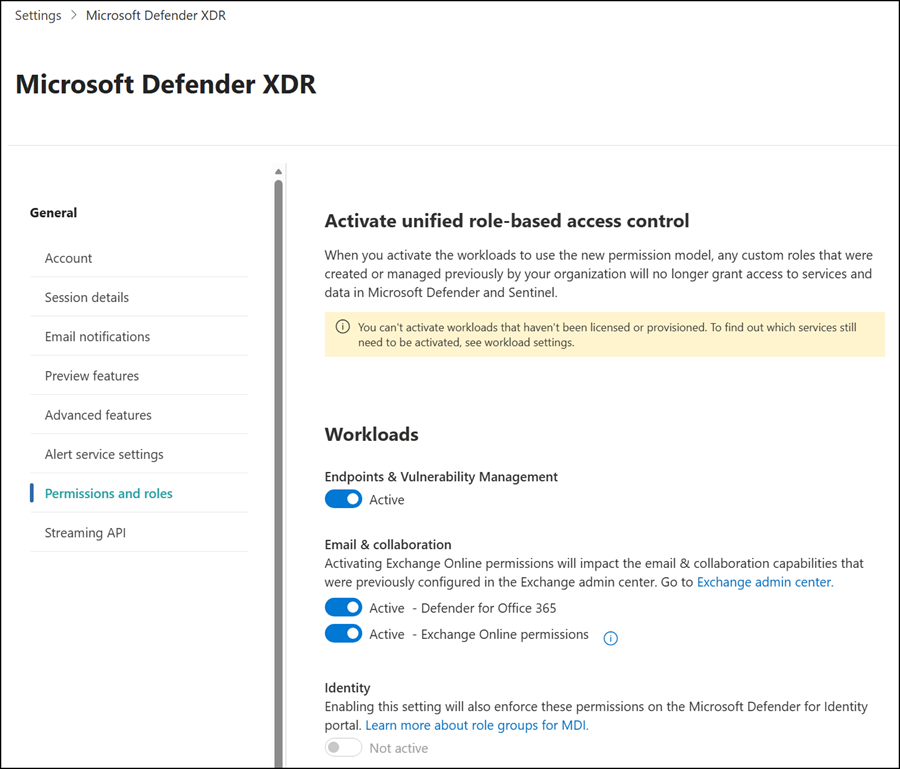
Admins using APIs to configure Defender roles and permissions should plan to transfer to the Unified RBAC API.
Impact to related products
- Entra directory roles like Global Administrator, Security Administrator, Security Operator, and Security Reader continue to grant access to the Microsoft Defender portal as they do today. These roles will now map to Unified RBAC permissions, as referenced in the documentation.
- For Azure RBAC, Microsoft Sentinel-specific workspace permissions (Sentinel Reader, Responder, Contributor roles) are auto-enabled in Unified RBAC.
- Email and Collaboration permissions and Exchange Online permissions continue to govern Exchange Online and Microsoft Purview scenarios. They are no longer required to operate Microsoft Defender for Office 365 portal experiences once Unified RBAC is active.
- Delegated access (B2B/GDAP) or Multi-Tenant management remains unchanged. Roles that had assignments to B2B/GDAP users/groups will be included in the automatic import.
- PowerShell for Defender for Office 365 continues to work as is.
