
Microsoft reported an incident in which the system accidentally created a new “All Company” Microsoft 365 group in Entra ID in some tenants. This group was created by Viva Engage. A tenant is not affected if you have no access to report MO1453783, published on 13 August 2026.
***********
Updated 20 August 2026:
The report MO1453783 expires on 20 August. If you do not find the report, check the samples below. Here is an excerpt of the report:
Our systems detected a recent service update, intended to fix an unrelated issue, that may have caused an unexpected duplicate Microsoft 365 group named “All Company” to be created within your organization, which would appear in Microsoft Entra ID, SharePoint Online, Microsoft Planner, and Microsoft OneNote. The impacting service update has been reverted and didn’t affect the original “All Company” group or its content. While no new duplicate “All Company” groups are being created with the offending service update reverted, any duplicate “All Company” groups that were created during the impact period of Friday, July 3, 2026, to Wednesday, July 8, 2026, may still exist within your environment. If action is not taken, users may see a duplicate “All Company” Microsoft 365 group in multiple Microsoft 365 services.
***********
The issue is a tenant usually already has an “All Company” group, used by Viva Engage. As a result, some tenants may now find two “All Company” groups if the first one was never renamed, or a newly created group if the first one was already renamed. Microsoft later renamed the faulty group to “Deprecated – All Company“.
Administrators should verify whether their tenant now includes a second “All Company” group. This group was created in early July.
The system defined all accounts with either the Global Administrator or Yammer Administrator role as the group owners when the role was active at the time of the incident. By default, the group has no members.
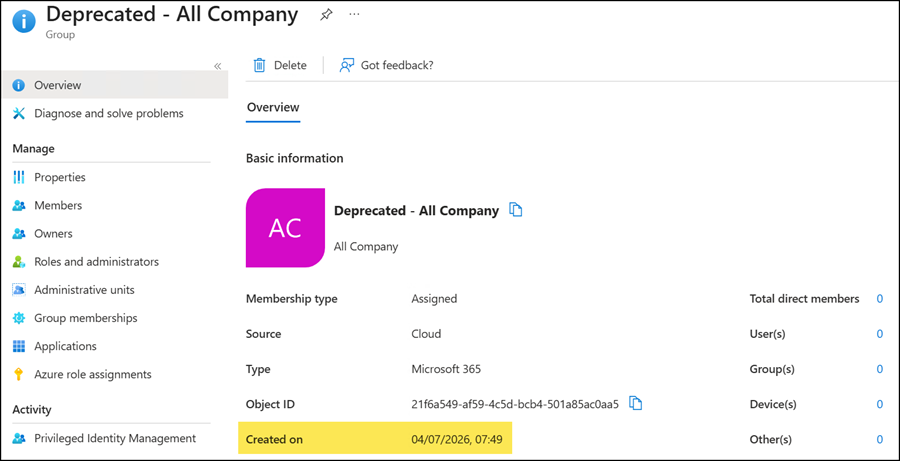
Microsoft does not delete the group, as it may have been used between creation and the rename.
Confirm that the duplicate group isn’t being used for collaboration, file storage, or other business processes. Sentinel can help to find such events. Below is a sample; you should be able to identify the group ID.
AuditLogs
| where TimeGenerated between (datetime(2026-07-01) .. datetime(2026-08-01))
| where Category == "GroupManagement"
| where OperationName == "Add group"
| where parse_json(tostring(InitiatedBy.app)).displayName == "Viva Engage"
| mv-expand TargetResource = TargetResources
| where tostring(TargetResource.displayName) in ("Deprecated - All Company", "All Company")
| extend GroupId = tostring(TargetResource.id)
| extend GroupName = tostring(TargetResource.displayName)
| project CreatedDate = TimeGenerated, GroupId, GroupName, OperationName

Filter the group activities for the month.
AuditLogs
| where TimeGenerated between (datetime(2026-07-04) .. datetime(2026-08-01))
| where Category == "GroupManagement"
| mv-expand TargetResource = TargetResources
| where tostring(TargetResource.id) == "<GroupId>"
| extend GroupId = tostring(TargetResource.id)
| mv-expand ModifiedProperty = TargetResource.modifiedProperties
| extend PropertyName = tostring(ModifiedProperty.displayName)
| extend OldValue = tostring(ModifiedProperty.oldValue)
| extend NewValue = tostring(ModifiedProperty.newValue)
| project TimeGenerated, OperationName, GroupId, PropertyName, OldValue, NewValue, InitiatedBy
| order by TimeGenerated asc
You can track all activities and identify the date when Microsoft updated the group name.
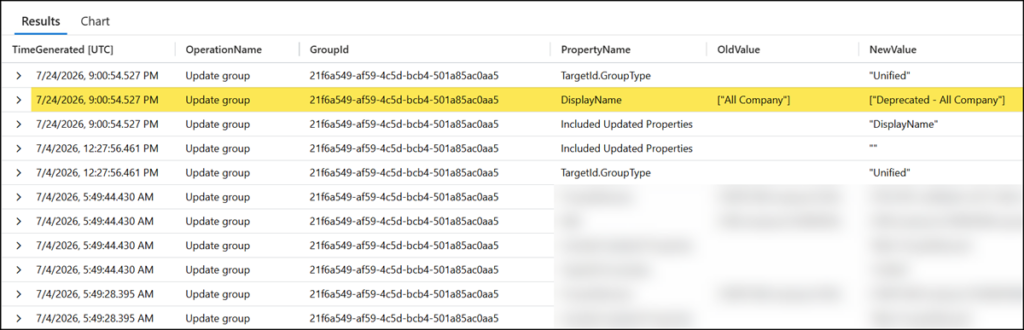
A query for Purview audit activities can then help to determine whether the group was used if you connected the Microsoft 365 Sentinel Connector.
search in (OfficeActivity) "<GroupID>"
| where TimeGenerated > datetime(2026-07-04)
Microsoft recommends deleting the miscreated group if you find nothing. If needed, you can restore the deleted group from the groups recycle bin for 30 days.
